

Your finance lead flags a cost spike. Or lead volume fell off and nobody can tell whether demand changed, tracking broke, or Google’s automation drifted. Or an agency just emailed offering a free audit before you sign a management contract.
That’s usually when people start clicking random reports and changing bids too early.
A good free Google Ads audit isn’t a pile of generic fixes. It’s a measurement-first investigation that tells you whether the account can be trusted, where spend is leaking, and whether the bidding system is learning from real business outcomes.
Table of Contents
- What a Free Google Ads Audit Actually Does
- Checking Conversion Tracking Before Anything Else
- Search Terms, Structure, and the Data Your Bidding Needs
- How PPC Geeks Can Help
- Free Tools and Reports Worth Pulling
- How to Tell If a Free Audit Is Biased
- Prioritizing Fixes Once the Audit Is Done
- Frequently Asked Questions
- Is a one-page audit summary enough?
- How often should you run a free Google Ads audit?
- What should a strong audit deliverable contain?
- Are free audits worth it if the agency wants a management contract?
- How long does a competent self-audit take?
- What should a good audit PDF actually look like?
- Which fixes should never be made in the same week as a tracking change?
- Can Google’s own recommendations replace an audit?
What a Free Google Ads Audit Actually Does
A proper free Google Ads audit reads the account as it exists today. It doesn’t rebuild history. It doesn’t create new ads, redesign landing pages, or rewrite your full campaign architecture on the spot.
What it should do is produce a short, ranked list of issues. Each issue should show the data behind it, the likely impact, and the effort required to fix it.
The three situations that usually trigger an audit
Most audit requests come from one of three places:
- A spend problem: CPCs rise, spend increases, or finance asks why paid search costs moved faster than revenue.
- A lead problem: campaigns kept running, but the lead flow slowed or quality dropped.
- A sales problem: an agency offers a free review, and you need to know whether the audit will be useful or just a pitch.
Those are different business triggers. The workflow for checking the account should still be the same.
The right sequence matters
Start with measurement. Then review search terms and structure. Only after that should you touch bidding and budgets.
If you change bids before checking tracking, you can hide the core problem. A broken conversion action can make a healthy campaign look weak, or make a weak one look efficient.
Practical rule: If conversion data is unreliable, every optimization after that becomes guesswork.
That sequence matters even more now that many accounts rely on automated bidding. Automation can only be as good as the events it’s optimizing toward.
What free audits are really built to surface
Free Google Ads audits have moved from manual consultant reviews to productized diagnostics. WordStream says its Google Ads Performance Grader has generated 6,536,213 total free Google Ads reports, and Adzooma reports 48M+ free performance reports generated, $17B+ in ad spend analyzed, and 23M+ account improvements suggested through its recommendation engine, which shows how widely these tools are used for quick benchmarking and prioritized recommendations (WordStream and Adzooma overview via Adalysis, WordStream grader details).
That scale changed expectations. People now expect an instant read on account health, not a consultant taking days to manually inspect settings.
What the deliverable should look like
A useful audit deliverable is short and specific. It usually includes:
- A finding
- The report or diagnostic used
- Why it matters
- What to fix first
- What can wait
If the output is just a score and a sales call invite, it’s not much of an audit.
A better version acts like a first-pass diagnostic layer. That’s similar to how teams use search visibility benchmarks in organic channels. You need a fast read on where you stand before deciding what deserves deeper work.
What it does not do
A free audit should not pretend to answer everything.
It won’t tell you your final creative strategy. It won’t replace CRM analysis. It won’t solve weak offer positioning or poor close rates in sales. It also won’t fully judge account economics if revenue quality lives outside Google Ads and nobody checks backend outcomes.
That’s why the best audits narrow the problem first. Then they tell you what can be trusted enough to optimize.
Checking Conversion Tracking Before Anything Else
Most bad audits start in the wrong place. They jump to keywords, ad copy, or bidding settings before checking whether the account is even counting the right actions.
That’s backwards.
One audit source notes that a full review should begin with access to the Google Ads account, the manager account if there is one, GA4, Google Tag Manager, and the CRM or real-outcome system, because read-only exports alone won’t expose every setting and later judgments depend on conversion data being real (Google Ads audit checklist on access and measurement).
Start with the conversion action list
Open Tools and Settings > Measurement > Conversions in Google Ads. Review every conversion action in the list.
You’re looking for stale actions, duplicate actions, micro-conversions marked as primary, and goals tied to old site versions. Inherited clutter is common, especially in older accounts that changed agencies or tracking setups.
A high-signal audit starts here because tracking issues are repeatedly flagged as one of the biggest defects in account reviews. One source says tracking problems show up in roughly 57.7% to 70%+ of accounts, which is why measurement QA is treated as the first gate before touching bids or budgets (Neil Patel on audit lessons and tracking defects).
Check whether the tags fire correctly
Use Tag Assistant. Don’t rely only on browser inspection.
Replay your core conversion paths and confirm the right tags fire on the right pages or events. If a thank-you page tag doesn’t fire, or if both GTM and gtag implementations are counting the same action, the account is already feeding bad signals into bidding.
Look closely at these failure modes:
- Missing thank-you page firing: the user completes the action, but Google Ads never records it.
- Duplicate implementations: GTM and direct tagging both send the same conversion.
- Wrong event names: the business thinks it’s counting a lead, but the platform is counting a softer interaction.
- Broken offline imports: conversions happen in the CRM but aren’t matched back to the click.
Reconcile Google Ads against GA4 and backend reality
Once the conversion list looks clean, compare counts across systems for a consistent time window. The goal isn’t perfect parity. Attribution models differ.
The goal is directional trust. If Google Ads says one thing, GA4 says another, and the CRM says something else again, you don’t have an optimization problem yet. You have a measurement problem.
That’s one reason people misread paid search performance when broader analytics systems miss or reclassify traffic. This is also why it helps to understand why GA4 under-reports ChatGPT traffic, because analytics gaps don’t stay neatly contained to one channel.
If the conversion signal is unstable, Smart Bidding will still optimize. It just won’t optimize toward what you actually want.
Review enhanced conversions and attribution settings
If the account uses lead forms or other non-purchase actions, verify that enhanced conversions are enabled and passing correctly. Check that user-provided data is being handled as intended and that attribution settings align with the business outcome being measured.
Also inspect whether the account imports the same conversion through multiple paths. That often happens when a form submission gets counted once through a tag and again through an offline sync.
Confirm value, not just volume
A lot of accounts track that a conversion happened but don’t pass useful value with the action. That limits how well the account can distinguish between a weak lead and a strong one.
If you sell products, revenue values should be checked. If you generate leads, value rules or imported offline outcomes should line up with what the sales team wants more of.
Here’s the practical line: no bid, budget, or structural change is safe until this part passes. Otherwise you’re optimizing noise.
Search Terms, Structure, and the Data Your Bidding Needs
Once measurement is sound, the next job is to inspect intent leakage. That starts in the Search Terms report, not in campaign settings.
The Search Terms report shows what users typed. That’s often very different from what advertisers think they targeted.
Use search terms to find waste first
Export search terms by campaign and sort by spend. Then tag each query into one of three buckets:
- Keep as-is
- Add as a negative
- Break out into its own theme
Fast savings usually appear. Independent audit writeups say missing or weak negative keyword lists appear in about 60% to 87% of accounts, and search-term leakage is often described as consuming 15% to 30% of spend, with some practitioners estimating waste around 20% to 40% depending on the account (independent Google Ads audit analysis).
That doesn’t mean every account leaks badly. It means this is one of the first places worth checking because the defects are common and actionable.
Separate account waste from account opportunity
Not every irrelevant-looking query should just be blocked. Some should become new ad groups or standalone campaigns if they show clear commercial intent.
A useful review asks:
- Is this query irrelevant?
- Is it relevant but badly matched to the current ad group?
- Is it good enough to deserve dedicated copy, landing page alignment, or budget isolation?
That’s where free audits often stop too early. They find waste, but they don’t ask whether the account structure gives bidding enough clean data to learn.
Check the three conditions automation needs
A modern Google Ads audit should focus on whether the account has enough high-quality conversion data for automation. One analysis frames that around quality, density, and selectivity, and recommends comparing spend against incremental conversions and marginal CPA against LTV rather than stopping at top-level ROAS (Search Engine Land analysis referenced here).
That framing is more useful than a checklist because automated bidding depends on signal quality, not just account cleanliness.
Quality
The conversion action must represent a real business outcome. If the account optimizes to page views, time on site, or weak micro-events, bidding can look efficient while sales quality drops.
Density
Campaigns need enough clean conversion data to learn. If data is spread across too many campaigns, ad groups, match types, audiences, or regions, each piece becomes too thin to guide bidding well.
Selectivity
The account should give Google clear signals about who matters. If overlapping audiences, duplicated themes, or mixed brand and non-brand intent are bundled together, automation gets noisy instructions.
Audit question: Is the account failing because bidding is bad, or because the structure starves bidding of clean data?
Structural problems that distort bidding
Some patterns show up repeatedly in underperforming accounts:
- Too many campaigns splitting data: every campaign has its own budget and too little signal.
- One-keyword, one-ad groups everywhere: neat on paper, but often too fragmented for modern bidding.
- Broad match with weak negatives: useful in the right account, expensive in the wrong one.
- Shared budgets across mixed intent: spend gets redistributed in ways that hide true profitability.
- Brand and non-brand mixed together: reporting gets blurred and bidding incentives clash.
To support that review, also inspect recommendation context. Google says Optimization score estimates how well an account is set to perform, is available at both the Customer and Campaign levels, and the RecommendationService can retrieve, apply, or dismiss recommendations, with some recommendation types eligible for auto-apply (Google Ads API recommendations documentation).
That matters because recommendation systems are useful inputs, not final judgment. They show what Google sees. They do not tell you whether the account is structured around your actual economics.
For deeper keyword expansion work after the audit, a focused process for finding long-tail keywords can help separate intent tiers without bloating the account.
The practical call
If a campaign doesn’t have enough trustworthy conversion signal, bid tweaks usually won’t fix it. Consolidation often will.
That means merging fragmented themes, separating brand from non-brand, tightening negatives, and giving automation cleaner data to work with before asking it to perform better.
How PPC Geeks Can Help
Some businesses don’t need another generic template. They need someone to inspect the account, verify tracking, and explain what matters in plain English.
That’s where a specialist team can be useful, especially if internal bandwidth is thin or the account has already been through several hands.
When a specialist agency is the right fit
PPC Geeks is a multi-award-winning Google Ads Partner and specialist PPC agency focused on paid media campaigns across Google Ads, Microsoft/Bing, Facebook, Amazon, and more. Its team is fully UK-based and covers ecommerce shopping, lead generation, remarketing, customised reporting, feed optimisation, landing page creation, and ongoing strategic reviews.
For this topic, the main value is straightforward. The team uses in-depth audits and onboarding to assess account performance, tighten conversion tracking, reduce wasted spend, and build a data-driven plan around traffic, leads, sales, and brand visibility.
The problems this solves
A specialist audit is usually most useful when:
- Tracking confidence is low: leads are being counted, but nobody trusts the numbers.
- Platform complexity has grown: Search, Performance Max, remarketing, and feeds are all active and nobody owns the whole picture.
- Management time is thin: the account needs ongoing review, not a one-off cleanup.
- Reporting is too vague: stakeholders need transparent explanations tied to business outcomes.
PPC Geeks is a sensible option if you want a team that can pair audit findings with implementation, especially for UK SMEs, ecommerce brands, and busy marketing managers. Their free Google Ads audit is most relevant when the issue isn’t just finding faults, but deciding what to fix first and who will do the work.
Free Tools and Reports Worth Pulling
A free audit is only as good as the screens and exports behind it. Generic dashboards hide too much.
Pull the raw reports instead. You want evidence, not a scorecard.
Free Tools and What to Extract from Each
| Tool | Specific Screen or Export | What It Answers |
|---|---|---|
| Google Ads | Search Terms report, filtered by cost | Which queries are spending money, and which ones don’t belong |
| Google Ads | Auction Insights | Whether performance pressure is internal or driven by competitor overlap |
| Google Ads | Change History | What changed before results moved |
| Google Ads | Conversion Status diagnostic under Measurement | Whether tracked actions are healthy enough to trust |
| Google Ads | Recommendations page | Which Google-detected issues affect optimization score most directly |
| GA4 | Traffic Acquisition filtered to cpc | Whether paid sessions and downstream engagement line up directionally |
| GA4 | Audience reports for demographic and interest overlap | Whether converters cluster in segments not reflected in targeting |
| Google Search Console | Query report by country | Whether brand demand and non-brand click patterns support what Ads reports show |
| Keyword Planner | Historical metrics for top converting terms | Whether baseline demand lines up with account assumptions |
| PageSpeed Insights | Mobile tests for top landing pages | Whether landing page speed is likely reducing paid efficiency |
| Tag Assistant | Conversion path replay summaries | Whether tags fire correctly through the real user journey |
| Google Ads asset and ad views | Responsive Search Ad strength and asset coverage | Whether ad groups are underbuilt or unevenly maintained |
What to pull from Google Ads
Start inside Google Ads because that’s where the auction data lives.
Focus on these screens:
- Search Terms: pull a recent window and sort by cost descending.
- Auction Insights: check overlap and outranking patterns before blaming the account alone.
- Change History: look for bid strategy changes, location edits, budget shifts, and broad match expansion.
- Recommendations: Google Help says recommendations are grouped into areas like Bidding & Budgets, Ads & assets, and Keywords & Targeting, and you can apply or dismiss individual or grouped recommendations from the Recommendations page (Google Ads Recommendations page guide).
Also review prioritization inside that same environment. Google says each recommendation shows the percentage impact it would have on optimization score, which at least gives you a numeric prioritization layer even if you don’t accept the recommendation itself (optimization score recommendation impact documentation).
What to pull from supporting tools
Use supporting tools to challenge the Google Ads story, not just repeat it.
- GA4: compare paid traffic quality and post-click engagement.
- Search Console: compare query demand and geography.
- Keyword Planner: reality-check whether your top converters match market demand patterns.
- PageSpeed Insights: check the pages that receive paid traffic, not random pages from the site.
- Tag Assistant: verify actual firing behavior on the main conversion paths.
If reporting feels too high-level, a tighter process for search engine marketing reporting helps because audits fail when teams summarize before they inspect.
Pull reports that answer one decision each. Don’t export data because the tool makes it available.
What not to rely on
Don’t rely on screenshots with no date range. Don’t rely on a single blended dashboard. Don’t rely on an agency score alone.
A free audit becomes useful when each recommendation can be traced back to a report, a time window, and a clear business question.
How to Tell If a Free Audit Is Biased
Most free agency audits have a built-in conflict. The same company diagnosing the issue usually wants to sell the fix.
That doesn’t make every free audit bad. It does mean you should test the output before trusting it.
Use the methodology test
A real audit shows the underlying evidence. That means dated exports, screenshots of actual reports, and a clear explanation of what was checked first, second, and third.
If you only receive a polished slide deck full of recommendations, you probably received sales collateral. Not analysis.
Use the scope test
Watch for certainty without proof.
One of the easiest ways to spot a weak audit is exaggerated urgency tied to unsupported claims. If someone says the account is wasting a huge part of budget but won’t show search terms, location settings, or the date range behind the claim, that’s a red flag.
Several recent guides also point out that agencies often use free audits as a sales tool, while Google’s own Recommendations tab can help as a free starting point but still misses account-specific context such as data sufficiency for target CPA and audience overlap (Google Ads audit checklist commentary).
Use the incentive test
Look at whether every finding maps neatly to a paid service.
If the audit always concludes you need management, new creative, landing page work, feed management, and account restructuring all at once, the output may have been shaped around what the agency sells.
A defensible audit should also include:
- Things you can fix yourself
- Things that need no action
- Things that can’t be concluded confidently from current data
That balance matters. Honest audits leave room for uncertainty.
If the auditor won’t share the raw data behind the recommendation, treat the recommendation as marketing.
What an independent-minded audit sounds like
It sounds narrower. More conditional. More willing to say “we can’t confirm this yet.”
It also tends to be less dramatic. The point of an audit is not to make the account look terrible. The point is to identify the most impactful next move.
That’s why some free audits are still useful even when they come from agencies. You just need to separate diagnosis from sales narrative.
Prioritizing Fixes Once the Audit Is Done
An audit isn’t finished when the issues are found. It’s finished when the issues are put into a sequence.
Without a structured approach, teams often lose value here. They get a flat list, try to fix everything at once, and muddy the data.
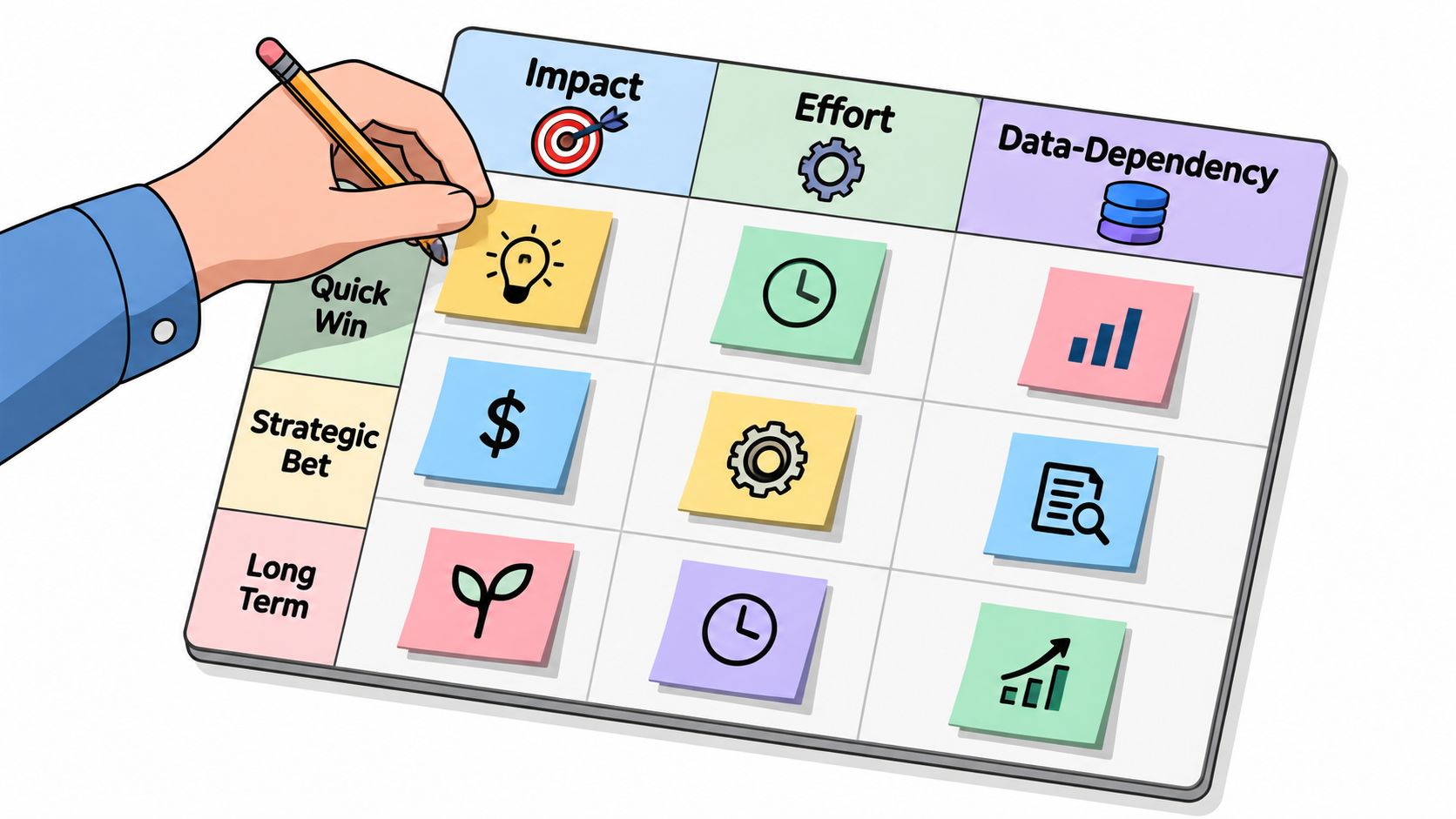
Use three decision filters
Every finding should be judged on three axes:
- Impact: how much cost, lead quality, or conversion volume the fix is likely to influence
- Effort: how much implementation work it needs
- Data dependency: whether you can measure the fix cleanly right now
The third filter is the one many teams skip. Some changes are sensible but shouldn’t be made until tracking is stable and enough clean data exists to read the result.
Fix in this order
Tracking issues always go first. If the signal is wrong, nothing else is stable.
Then move to bidding and budget controls. Those changes work on the cleanest available signal and often return feedback faster than structural rebuilds.
Then address structure. Campaign consolidation, match-type cleanup, and budget isolation can improve learning conditions, but they also reshuffle data and reset the environment.
Creative and landing page work usually comes after that. Those tests are easier to interpret when the account structure and measurement are already trustworthy.
A practical four-phase rollout
You don’t need a giant transformation plan. You need controlled sequencing.
Phase one
Stabilize measurement. Remove duplicate conversion actions, verify firing, and confirm that primary goals match the business outcome.
Phase two
Cut obvious waste. Tighten negatives, review search partner and placement leakage where relevant, and fix geo settings that don’t match the service area.
Phase three
Clean up structural blockers. Consolidate fragmented campaigns, separate brand from non-brand where needed, and stop splitting already-thin data into too many compartments.
Phase four
Test message and page improvements. Once conversion data is stable, ad variation and landing page work become easier to interpret.
Put gates between phases
Don’t stack unrelated changes in the same week if you need to learn from results.
For example, if you change tracking and campaign structure at the same time, you won’t know whether performance movement came from better measurement or from the new setup. The same caution applies when teams update bidding strategy, negatives, and landing pages all together.
That discipline matters in every growth channel. The same principle shows up when teams try to increase website authority. If you change too many inputs at once, you lose the causal signal.
What the final action plan should look like
Keep it short.
A strong action plan names the issue, ranks the priority, states who owns the fix, and defines the condition for moving to the next phase. It should read like an operations document, not a brainstorming list.
Frequently Asked Questions
Is a one-page audit summary enough?
For decision-making, yes. For execution, no.
Use a one-page summary for the ranked findings and next actions. Keep a supporting spreadsheet or folder of exports behind it so every recommendation can be traced back to data.
How often should you run a free Google Ads audit?
Run a deeper audit on a regular cadence, then review the highest-risk areas more often.
A practical rhythm is:
- Full audit quarterly
- Tracking and search-term review weekly
- Bidding review monthly
That cadence works because the account doesn’t usually break everywhere at once. It breaks in predictable places first.
What should a strong audit deliverable contain?
A strong output includes:
- Raw exports or screenshots: dated and tied to a specific report
- Prioritized actions: ranked by impact, effort, and dependency
- Clear scope: what was checked and what was not
- Confidence notes: where the data is strong and where it is thin
- Before and after tracking plan: if implementation is part of the work
A weak output is just a branded PDF with generic recommendations and no evidence.
Are free audits worth it if the agency wants a management contract?
Sometimes, yes.
A free audit can be useful if the methodology is transparent and the agency is willing to show raw data, explain exclusions, and point out fixes you can make without hiring them. If every conclusion pushes you toward a retainer without proving the diagnosis, treat it as a sales pitch.
How long does a competent self-audit take?
It depends on account size and complexity.
A small, clean account can be reviewed in a couple of focused hours. A large account with multiple campaigns, imported conversions, Performance Max, CRM syncs, and inherited clutter can take most of a day or more.
What should a good audit PDF actually look like?
It should be plain.
The best ones usually include a short executive summary, a list of findings in priority order, screenshots or report snippets, and a simple action roadmap. If the document spends more space on branding than on evidence, it’s probably not the output you want.
Which fixes should never be made in the same week as a tracking change?
Avoid stacking major interpretation-sensitive changes with tracking updates.
That usually means holding off on full bid strategy shifts, major structural rebuilds, and large landing page tests until the new measurement setup is confirmed. If you combine those changes, you’ll struggle to tell whether performance changed because the account improved or because the counting changed.
Can Google’s own recommendations replace an audit?
No, but they can help.
Google’s recommendation system is useful for spotting platform-detected opportunities and prioritizing by optimization score impact. It still won’t understand your sales quality, CRM outcomes, LTV logic, or whether the account is structured around the wrong conversion event.
If your team is trying to measure visibility beyond paid search, especially inside AI-generated answers, Airefs helps brands track where they appear, which sources shape those mentions, and what actions can increase recommendation share across tools like ChatGPT and Google AI Overviews.