

A page can be well written and still vanish from an AI answer. If crawlers can’t reach it, index it, render its primary content, or understand what the page represents, the quality of the copy won’t rescue it.
This technical SEO audit checklist focuses on ten prioritized checks across five operating groups: crawl access, indexing, page experience, page meaning, and site architecture with reliability. Every check includes a severity label, a test to run, a practical fix, and a note on how the finding can affect visibility in AI-generated answers.
The order matters. Start with access and indexability, then verify rendering, performance, structured meaning, links, and server reliability. A technically clean site gives search engines and AI systems a stable source to fetch, interpret, and potentially cite.
Table of Contents
- 1. seopaslaugos.io
- 2. Audit Core Web Vitals and Page Speed
- 3. Verify Robots.txt and Crawl Directives
- 4. Check XML Sitemap Structure and Completeness
- 5. Analyze Indexation Status and Coverage
- 6. Audit Canonical Tags and Duplicate Content
- 7. Review Meta Tags, Titles, and Descriptions
- 8. Implement and Validate Schema Markup
- 9. Check Mobile Responsiveness and Mobile Indexing
- 10. Audit Internal Linking Structure and Anchor Text
- 11. Monitor Crawl Errors, Status Codes, and Server Response Health
- 11-Point Technical SEO Audit Comparison
- Turn the Audit Into a Repeatable Routine
1. seopaslaugos.io
Severity: high when technical defects are tied to lost leads, local visibility, ecommerce indexation, or missing AI citations.
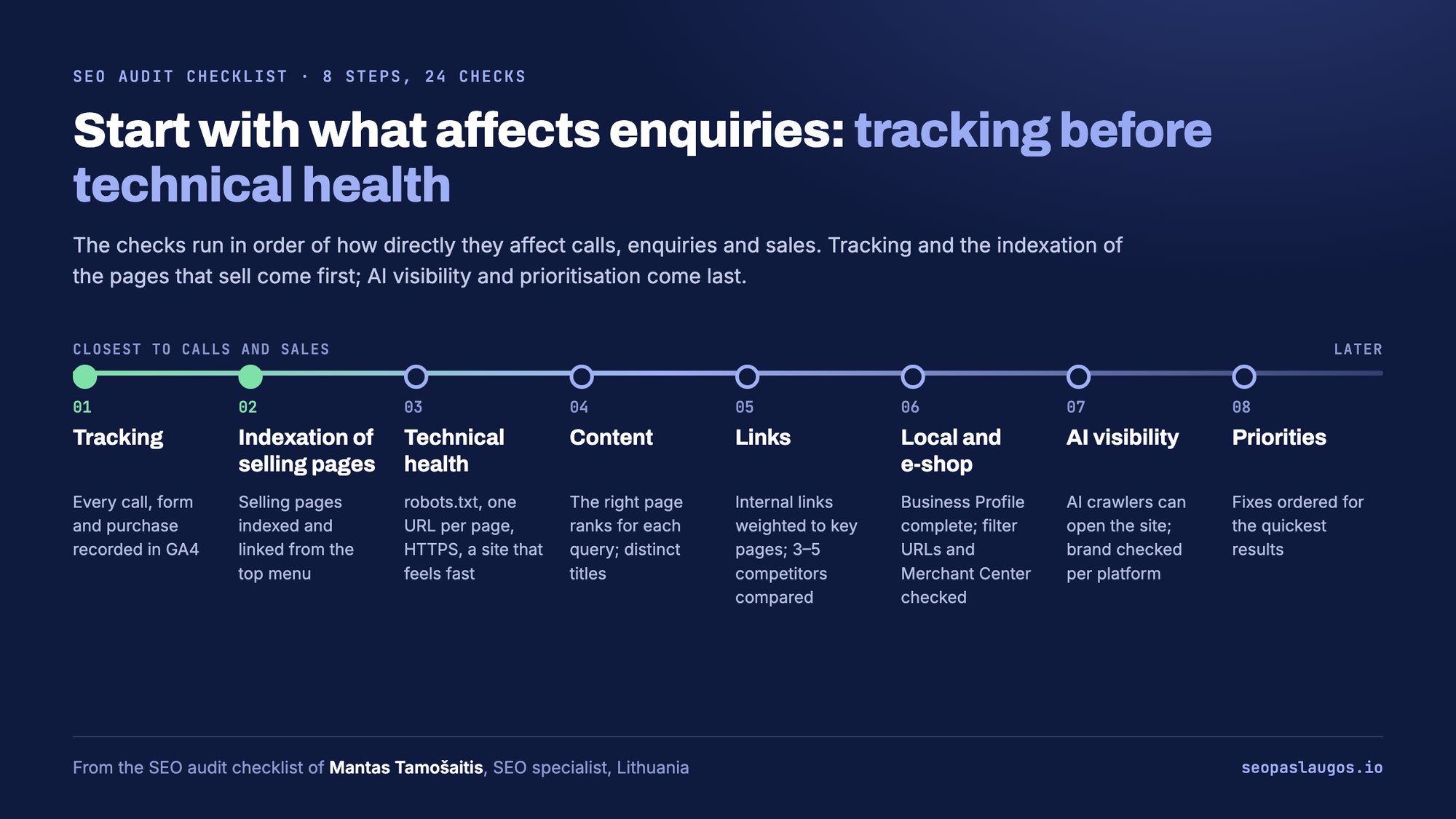
Some audit tools identify problems but leave the team to decide what matters commercially. seopaslaugos.io, the practice of Lithuanian technical SEO consultant Mantas Tamošaitis, takes a broader implementation view for service businesses and ecommerce companies. Its work connects technical SEO with calls, enquiries, and sales, rather than treating traffic or rankings as the final outcome.
What it solves
For a B2B or local service site, the problem may be a slow template, weak indexing, poor city-page architecture, or commercial pages that don’t match purchase intent. For an online store, the same audit needs to address faceted navigation, duplicate product paths, category structure, filter controls, and the discoverability of important catalogue pages.
The service combines technical SEO with internal SEO, external SEO, local search, ecommerce SEO, conversion tracking, and AI SEO. That combination is useful when a technical finding can’t be judged in isolation. A canonical correction may affect category visibility, while a local landing-page change may only matter if calls and forms are tracked correctly.
Practical rule: A technical recommendation is stronger when the team can connect it to a page type, a customer journey, and a measurable business action.
Where the fit is strongest
seopaslaugos.io is a sensible choice when you need one specialist to work directly on the site instead of passing every decision through a separate project-management layer. Its AI SEO work focuses on structuring content, facts, and data so ChatGPT and Google AI can interpret and cite the site, while AI visibility is measured as an active channel.
The commercial model also differs from a standard retainer. Alongside work on a client’s existing site, the company offers a partnership model for service businesses where payment can be tied to agreed orders rather than a monthly fee. That shifts more delivery risk toward the provider, so it should be evaluated carefully against lead quality, attribution, sales-cycle length, and the definition of an eligible order.
Choose seopaslaugos.io’s technical SEO audit checklist when the audit must lead into implementation across technical SEO, commercial content, local search, links, and conversion tracking. The checklist reflects the audits Mantas runs for his own clients. It may be less suitable if you only need a one-off crawl export with no development or revenue-accountability component.
2. Audit Core Web Vitals and Page Speed
Severity: high for revenue templates, mobile landing pages, and pages that AI-referred visitors reach directly.
Core Web Vitals give the performance review measurable boundaries. Largest Contentful Paint, or LCP, should be 2.5 seconds or less, Interaction to Next Paint, or INP, should be 200 milliseconds or less, and Cumulative Layout Shift, or CLS, should be 0.1 or less for a good experience, according to Google’s Core Web Vitals documentation.
Run both lab diagnostics and field measurements. PageSpeed Insights and Lighthouse help isolate render-blocking CSS, image discovery, long JavaScript tasks, missing dimensions, unstable advertisements, and late fonts, while field data shows how real users experience the template across devices and connections.
Test by template, not by homepage
Segment results by mobile and desktop, template, geography, device class, connection conditions, and page type. Prioritize the 75th percentile rather than a sitewide average, because a fast homepage can hide a slow pricing page, documentation template, comparison page, or signup-entry page.
HTTP Archive data recorded 32% of mobile websites and 41% of desktop websites as passing all three metrics in 2021, with the mobile result reaching 36% in 2023 and the desktop result reaching 48% in 2023. Those figures are available in the HTTP Archive technical report, and they show why a pass/fail check shouldn’t stop at one polished URL.
Fix the cause mapped to the metric. LCP usually points to server response time, render-blocking resources, or hero media. INP exposes expensive event handlers, long tasks, and third-party scripts. CLS commonly comes from images without reserved space, injected components, ads, and fonts that arrive late.
A performance finding affects AI-answer visibility indirectly but materially. If a deep page loads unreliably or renders its answer late, crawlers and users receive a weaker source, even when the written content is strong.
3. Verify Robots.txt and Crawl Directives
Severity: critical when a rule blocks an indexable section, locale, documentation area, or commercial template.
Open /robots.txt on every relevant host and test the response, user-agent groups, Disallow paths, Allow exceptions, and sitemap references. Check Googlebot rules separately from rules intended for other crawlers, and review AI crawler access with a current user-agent reference such as this AI search crawler user-agent guide.
A robots file controls crawling, not canonical consolidation. Don’t use it to hide duplicate pages when the requirement is a canonical or noindex signal, because blocking access can prevent crawlers from seeing the signals on the URL itself.
What to inspect
- Critical paths: Confirm that services, products, categories, documentation, articles, and important locale folders aren’t blocked accidentally.
- Private areas: Keep login, account, checkout, and administrative paths out of normal crawling where appropriate, but verify that public content isn’t nested under an accidentally blocked directory.
- Rendering resources: Check that essential CSS, JavaScript, images, and APIs needed to render primary content remain accessible.
- Environment controls: Make sure staging and QA environments don’t expose indexable content, while production isn’t carrying over a blanket staging rule.
The usual fix is small, but the impact can be large. Remove an accidental block, narrow a wildcard rule, or correct a path-specific exception, then validate representative URLs in Search Console and with a live fetch.
Robots directives affect AI visibility at the access gate. If an AI crawler can’t fetch the page or the resources needed to understand it, the content has little chance of being used as a source. Don’t assume a change is visible everywhere immediately. Different crawlers refresh and interpret rules on their own schedules.
4. Check XML Sitemap Structure and Completeness
Severity: high for large, deep, frequently updated, or recently migrated sites.
An XML sitemap should contain the URLs you want crawled and indexed, not every URL the CMS happens to generate. Compare sitemap entries with canonical targets, HTTP status codes, noindex directives, Search Console data, internal-link depth, and server-log activity.
Google’s guidance makes crawl budget a conditional concern. It becomes material primarily for very large sites, including properties with hundreds of millions of periodically changing pages or tens of millions of frequently changing pages, rather than for every small brochure site. For those sites, use Google’s crawl and indexing guidance alongside log and coverage data.
Test the sitemap as an operating signal
Use accurate lastmod values to identify meaningful updates. Segment sitemap indexes by logical groups such as products, categories, services, locations, documentation, or editorial content so that a sudden coverage change can be traced to a template.
A sitemap can help crawlers discover deep URLs and understand which content changes, but it doesn’t guarantee crawling or indexing. Remove redirected, blocked, duplicate, non-canonical, and error URLs, then resubmit the corrected sitemap and monitor the relationship between submitted, discovered, and indexed pages.
A practical test compares four sets:
- Sitemap URLs: Pages the business says matter.
- Crawl activity: URLs Googlebot and other relevant crawlers request.
- Indexing data: URLs Search Console reports as indexed or excluded.
- Internal links: Pages that the site makes easy or difficult to discover.
For larger sites, also inspect parameterized, faceted, duplicate, orphan, and low-value URL patterns. Don’t spend crawl-budget time on a theoretical cleanup if the property is small and stable. Use the sitemap as a trustworthy map, then validate whether crawlers and AI systems can reach the pages it names. Resources such as the explanation of llms.txt and llms-full.txt can be considered separately, but they don’t replace conventional sitemap, indexing, and crawl controls.
5. Analyze Indexation Status and Coverage
Severity: critical when high-intent pages are excluded, canonicalized incorrectly, or crawled without being indexed.
Open the Search Console Pages report and group findings by template. Review indexed pages, excluded pages, crawl errors, redirect destinations, soft errors, duplicate clusters, canonical decisions, and URLs that were crawled but not indexed.
The test goes beyond “is the domain indexed?” Sample representative pages from services, pricing, documentation, comparison, blog, product, category, and location templates. Inspect the raw response and rendered page, then compare the intended canonical, robots directives, internal links, sitemap presence, and visible primary content.
Separate discovery from selection
A page can be discoverable but not indexed. It can also be indexed under a different canonical, or indexed with incomplete rendered content. Those situations require different fixes, so record the reason rather than creating one undifferentiated “indexation problem” ticket.
For large sites, compare indexed versus discoverable URLs, server-log Googlebot activity, sitemap entries, Search Console data, and internal-link depth. This reveals whether important pages are difficult to find, whether duplicate patterns consume attention, or whether the site is presenting weak candidates for inclusion.
The AI visibility consequence is direct. A page that isn’t indexed by a search system may still be encountered by another AI system, but you can’t treat that possibility as a dependable distribution strategy. Improve indexability first, then measure whether the repaired page appears in answers with AI SEO tips for technical visibility as a useful supporting reference.
Don’t promise an AI citation merely because a page enters Google’s index. Indexation establishes eligibility. Citation still depends on relevance, clarity, source selection, freshness, and the answer context.
6. Audit Canonical Tags and Duplicate Content
Severity: high when multiple URLs represent the same intent or when the canonical points to a different page type.
Fetch representative URLs with parameters, filters, pagination, alternate protocols, trailing-slash variants, print views, and syndicated copies. Compare the HTML canonical, HTTP header canonical where used, sitemap URL, internal links, redirects, and hreflang references.
A unique indexable page will often use a self-referencing canonical. Consolidated duplicates should point to the intended master, but don’t assume every similar URL needs to disappear. Product variants, regional pages, language versions, and paginated collections may need separate treatment based on user intent and business rules.
Test canonical consistency
Look for canonicals that point to:
- A redirecting URL.
- A non-200 response.
- A
noindexpage. - A different language or region without a valid reason.
- A parameter-stripped page that loses meaningful intent.
- A homepage or broad category that doesn’t satisfy the same query.
Use search operators for duplicate and indexation checks as a supplementary investigation method, not as a substitute for crawling and Search Console evidence.
Correct canonicalization concentrates signals on the page you want machines to understand and cite. It also prevents an AI system from selecting a thin parameter version, an outdated copy, or a less relevant regional page. Misconfigured canonicals do the opposite, so validate the final rendered DOM and response headers after deployment, not only the CMS field.
7. Review Meta Tags, Titles, and Descriptions
Severity: medium in most audits, high when templates produce misleading titles, missing descriptions, or conflicting locale signals.
Review title tags, meta descriptions, robots directives, Open Graph fields, language declarations, and canonical references at the template level. Titles and descriptions don’t directly determine AI ranking, and AI systems may ignore them, but clear metadata gives crawlers and answer systems a concise statement of page purpose.
Use unique titles that describe the actual page and put the commercial or informational intent near the front. Write descriptions that summarize the answer a visitor will find, rather than stuffing variants or repeating the brand across every URL.
Test representative page groups
Check:
- Service pages: Does the title identify the service and relevant market?
- Documentation: Does the title identify the task, product, or problem solved?
- Pricing pages: Does the description accurately describe plans or buying context?
- Product and category pages: Are titles distinct enough to separate catalogue intent?
- Local pages: Does the metadata match the location and the visible offer?
Open Graph tags can influence how a page is previewed when content is shared or retrieved through other systems. Schema provides additional structured meaning, but it can’t compensate for a title that labels a product page as a generic blog post.
The AI-answer benefit is contextual accuracy. When an answer system cites a page, good metadata can help it represent the source correctly, although the system may extract its summary from visible page content instead. Treat metadata as a fast, scalable clarity layer, not as a guarantee of citation frequency.
8. Implement and Validate Schema Markup
Severity: high when structured data conflicts with visible content or describes the wrong entity.
Schema markup gives machines explicit fields for articles, authors, organizations, products, offers, reviews, breadcrumbs, and frequently asked questions. Use JSON-LD where practical, then validate the live output with Google’s Rich Results Test and a schema validator.
Start with the page’s actual identity. An article should identify publication context and authorship where available. An organization should use consistent brand and contact information. A product should reflect visible product facts, including availability and pricing where those details are shown.
Match markup to reality
Google’s FAQ guidance requires actual questions and answers, the required properties, validation with the Rich Results Test, and accessibility to Google. It also distinguishes official FAQ content from user-generated forums, where Q&A Page markup is more appropriate, as described in Google’s FAQ structured-data documentation.
Use a template sample to find schema drift. Compare several pages of the same type and look for fields that change because of plugin settings, theme logic, experiments, or stale CMS data. Fix the generation rule instead of editing isolated URLs.
Accurate schema can improve AI-answer visibility by reducing ambiguity. It helps systems distinguish a company from a product, a guide from a forum answer, and a current offer from an obsolete one. It won’t force a citation, and incorrect markup can be ignored or create a trust problem, so visible content and structured data must agree.
9. Check Mobile Responsiveness and Mobile Indexing
Severity: critical when mobile templates omit content, links, metadata, structured data, or important navigation.
Google announced mobile-first indexing in 2016, began rolling it out in March 2018, and made it the default for newly discovered sites by July 2019. In October 2023, Google confirmed that the transition had effectively reached completion, while noting that a small number of sites could remain on desktop crawling for technical reasons, according to the HTTP Archive technical report.
Audit mobile and desktop as separate experiences. Compare primary text, structured data, metadata, canonical signals, images, internal links, navigation, rendered HTML, server responses, redirects, viewport configuration, and JavaScript output. Don’t rely on source HTML alone if the page changes after rendering.
Run a parity test
Use real devices as well as browser emulation. Check that users can read the main content without awkward horizontal scrolling, tap navigation and calls to action, and access content that exists on desktop. Confirm important resources aren’t blocked or delayed behind a mobile-only script failure.
A technically sound desktop page can lose discoverability when the mobile template drops an explanation, product attribute, internal link, or navigation path. The index generally evaluates the version users encounter on smartphones, regardless of the company’s target market.
Mobile parity also affects AI answers. If a crawler sees a reduced page, it may extract an incomplete answer or miss the evidence that makes the page useful. Record mobile usability, responsive behavior, viewport configuration, resource access, and JavaScript-rendered content as separate findings rather than collapsing them into one “mobile” label.
10. Audit Internal Linking Structure and Anchor Text
Severity: high for orphaned commercial pages, deep documentation, newly published content, and pages that need stronger topical context.
Internal links are both navigation and evidence of relationship. A contextual link from a relevant guide can help a crawler connect a pricing page, integration page, or feature explanation to the topic it supports, while a generic “click here” anchor provides little descriptive value.
Export internal links with a crawler such as Screaming Frog or Sitebulb, then inspect inbound links, destination status, anchor text, click depth, redirects, and orphan pages. Review global navigation, breadcrumbs, related-content modules, footer links, and body links separately.
Prioritize links by business value
Start with pages that drive enquiries, trials, demos, purchases, or support-assisted conversions. Add links from authoritative and contextually relevant pages, not from every page on the site. A large menu can spread attention widely without making the intended hierarchy clearer.
Use descriptive anchors that tell both users and crawlers what the destination covers. Keep the wording natural, vary it where appropriate, and remove links that point to redirects or broken URLs. For a new page, add relevant links from existing hubs soon after publication so discovery doesn’t depend entirely on the sitemap.
Internal-link quality affects AI visibility through discoverability and interpretation. A page with no meaningful inbound links may be crawled less often and may look disconnected from the site’s subject structure. Over-linking creates the opposite problem, diluting hierarchy and making it harder to identify which pages answer which questions.
11. Monitor Crawl Errors, Status Codes, and Server Response Health
Severity: critical for repeated 5xx responses, timeouts, DNS failures, broken redirects, or outages affecting priority pages.
Run a crawl that records every HTTP response, then compare the results with uptime monitoring, CDN logs, server logs, and deployment history. Inspect 4xx responses, 5xx responses, redirect chains, timeout patterns, DNS failures, false 200 pages, and inconsistent responses between bots and ordinary users.
A 404 or 410 can be correct for removed content. A 500 or 503 indicates a server problem that can prevent fetching. A redirect chain wastes crawl effort and slows access, while a DNS failure blocks the crawler before it can evaluate the page at all.
Test reliability over time
A one-time crawl won’t reveal intermittent failures. Monitor important URLs after releases, migrations, plugin changes, CDN configuration updates, and traffic spikes. Check that robots.txt, XML sitemaps, canonical headers, and page templates still return the intended response after infrastructure changes.
Use Airefs AI crawler analytics to connect crawler activity with AI visibility work. Airefs also tracks prompts, brand mentions, competitors, and the sources that AI systems use, so a technical repair can be evaluated alongside changes in answer presence rather than only traditional crawl metrics.
Reliable access supports AI-answer visibility because a source must remain reachable when a system fetches or refreshes it. Fix the server behavior first, then allow enough time for crawlers and answer systems to encounter the repaired response. Don’t describe a page as “fixed” while monitoring still shows intermittent failures.
11-Point Technical SEO Audit Comparison
| Item | Implementation complexity | Resource requirements | Expected outcomes | Ideal use cases | Key advantages |
|---|---|---|---|---|---|
| seopaslaugos.io | Medium–High (comprehensive, multi-discipline SEO) | Agency expertise, site access, analytics, content & dev collaboration | More calls, leads and sales; improved local and AI visibility | Local service businesses, e‑commerce with conversion focus | Outcome-driven metrics, AI integration, local SEO, alternative payment models |
| Audit Core Web Vitals and Page Speed | Medium (front-end and infra changes) | Dev time, CDN, performance tooling, testing on devices | Faster load times, better UX, higher crawl priority and AI citations | High-traffic sites, documentation, SaaS, e‑commerce | Direct impact on crawlability and user engagement |
| Verify Robots.txt and Crawl Directives | Low | Technical audit, one-off edits, testing tools | Immediate improvement in crawlability when misconfigured | New sites, migrations, sites with accidental blocks | Quick wins; prevents accidental exclusion from AI/indexing |
| Check XML Sitemap Structure and Completeness | Low–Medium | CMS/config updates, automation, sitemap validation | Faster discovery of new/updated pages; prioritized crawling | Large sites, sites with frequent updates or deep hierarchies | Speeds indexing and signals important pages to crawlers |
| Analyze Indexation Status and Coverage | Medium | Google Search Console access, tracking, investigative effort | Clear view of which pages are indexed; prioritized fixes to increase visibility | Sites with missing or irregular search presence | Direct insight into indexed vs excluded content; prioritization |
| Audit Canonical Tags and Duplicate Content | Medium–High | Developer changes, auditing tools, content normalization | Consolidated authority, reduced duplicate indexing, clearer citations | E‑commerce with faceted URLs, syndicated content, pagination | Concentrates AI/SEO value on canonical pages; saves crawl budget |
| Review Meta Tags, Titles, and Descriptions | Low | Content edits, bulk metadata tools, editorial time | Better snippet selection by AI, improved CTR from citations | Content-heavy sites, blogs, documentation needing accurate snippets | Improves representation in AI snippets and user click-through |
| Implement and Validate Schema Markup | Medium | Dev work, schema validation, ongoing maintenance | More accurate AI citations, eligibility for rich results | Blogs, product pages, organizations, FAQs, news sites | Provides structured context so AI extracts correct info |
| Check Mobile Responsiveness and Mobile Indexing | Medium–High | Design/dev effort, mobile testing on devices, performance tuning | Proper mobile-first indexing, better mobile AI visibility and UX | Mobile-first audiences, apps, sites with heavy mobile traffic | Aligns site with mobile-first AI crawlers; improves mobile Vitals |
| Audit Internal Linking Structure and Anchor Text | Low–Medium | Content updates, link strategy, editorial review | Improved discovery of important pages and topical relevance | Large content sites, blogs, knowledge bases | Low-cost way to boost discovery and clarify topical relationships |
| Monitor Crawl Errors, Status Codes, and Server Health | Medium | Monitoring tools, alerts, infrastructure fixes, dev time | Fewer indexing interruptions, restored pages, stable visibility | Sites with uptime or server issues, high-traffic platforms | Prevents silent loss of AI visibility due to server or HTTP errors |
Turn the Audit Into a Repeatable Routine
A technical SEO audit produces value when it becomes a prioritized operating system, not a long export of warnings. Fix the issues that prevent access, rendering, indexation, or accurate interpretation before spending time on lower-impact metadata refinements.
Use severity in practical terms:
- Critical: A page or template is blocked, unavailable, excluded unintentionally, or rendered without primary content.
- High: A problem affects important templates, duplicate clusters, deep commercial pages, mobile parity, structured meaning, or repeated crawl paths.
- Medium: The issue reduces clarity, efficiency, or presentation but doesn’t block access or indexation.
- Low: The issue is worth cleaning when related work is already scheduled, but it shouldn’t displace a critical repair.
Build the fix queue around evidence
For every finding, record the affected template, example URLs, evidence, owner, implementation change, validation method, and AI-answer implication. “Fix canonical issues” is too vague for engineering. “Remove the canonical from the pricing template that points to the homepage, then verify the rendered head and Search Console inspection” is actionable.
Prioritize the gates in this order:
- Access and availability: Robots rules, DNS, timeouts, 4xx and 5xx responses, redirects, and crawlable resources.
- Indexation controls: Noindex directives, canonical targets, sitemap accuracy, duplicate URL patterns, and orphan coverage.
- Rendered parity: Mobile versus desktop content, JavaScript output, metadata, structured data, images, and internal links.
- Experience: LCP, INP, CLS, server response, images, scripts, fonts, and unstable interface elements.
- Meaning and architecture: Schema, titles, descriptions, breadcrumbs, anchors, hubs, and links between related pages.
- Measurement: Search Console trends, server logs, field performance, crawler activity, conversions, and AI-answer mentions.
Match the cadence to the risk
Review indexation and important response errors regularly, especially after releases. A weekly Coverage review is appropriate for an active B2B SaaS site with frequent publishing or deployments, while a quarterly robots.txt review catches rule changes that may otherwise sit unnoticed. Large ecommerce sites and rapidly changing platforms need more frequent sitemap, log, and parameter checks than stable brochure sites.
Run Core Web Vitals with field data and segment the results by mobile, desktop, template, country, device, connection, and page type. Lab tools are useful for diagnosis, but they can’t replace real-user measurement. Track the 75th percentile and prioritize conversion-bearing pages rather than optimizing every URL equally.
Measure whether repairs change AI visibility
Traditional SEO reporting can confirm that a page is indexed, linked, and technically eligible. It can’t tell you whether ChatGPT, Google AI Overviews, Perplexity, or another system recommends the page or brand in the answers that matter.
Airefs is built for that measurement layer. Teams can track business prompts over time, compare brand and competitor mentions, inspect the public pages and discussions that influence answers, and identify content or discussion opportunities. Its Website Technical Scan also checks areas that overlap with this checklist, including sitemaps, schema, page speed, internal links, and AI-focused files such as llms.txt.
After a fix ships, record the change date and monitor the relevant URLs and prompts. Look for improved crawl activity, stable indexation, clearer source attribution, and more frequent or more accurate brand mentions. Don’t claim causation from one answer. Compare patterns over time and note when the data is limited.
FAQ
Which technical SEO checks should be fixed first?
Fix blocked or unavailable pages first, followed by accidental noindex rules, incorrect canonicals, broken redirects, missing sitemap coverage, rendering failures, and mobile content gaps. Performance, schema, metadata, and internal linking should follow once the access and indexation gates are stable.
Which tools are useful for a technical SEO audit?
Use Google Search Console for indexing and field performance, a crawler such as Screaming Frog for links and technical responses, PageSpeed Insights and Lighthouse for performance diagnosis, Rich Results Test for structured data, server logs for crawler behavior, and Airefs for AI-answer visibility and source analysis.
How often should a technical SEO audit be run?
Run a full audit after migrations, redesigns, CMS changes, framework changes, and major infrastructure releases. Maintain lighter recurring checks for indexation, response errors, sitemaps, field performance, and AI-answer visibility between full audits.
How do technical fixes affect AI-answer visibility?
They improve the conditions required for a page to be fetched, indexed, rendered, and interpreted. A fix doesn’t guarantee a citation, because answer systems also weigh relevance, source quality, clarity, and the question being answered, but technical defects can make a strong page unavailable or difficult to use.
If you want to turn this checklist into an implementation backlog, start by exporting your priority templates, Search Console exclusions, sitemap URLs, and recent server errors. Then compare the repaired pages in search and AI answers with Airefs, so your team can see whether technical work is improving eligibility and recommendation quality, not just reducing the warning count.