
Articles
Content gaps to target, and AI-generated articles written and delivered on your schedule — to rank in both AI answers and Google.
The Articles page finds the content gaps most likely to move your AI visibility, then writes the article for you. Recommendations are pulled from your prompt data, SEO keywords, competitor content, and content best practices; from there, Airefs’ AI content agent researches, structures, and optimizes each piece to be cited by AI and to rank in Google.
The Articles page has three parts:
- Recommendation backlog — content gaps sourced from several signals.
- Automatic scheduling — turns backlog ideas into a written queue.
- Articles created by Airefs — finished drafts from our AI content agent, ready to publish.
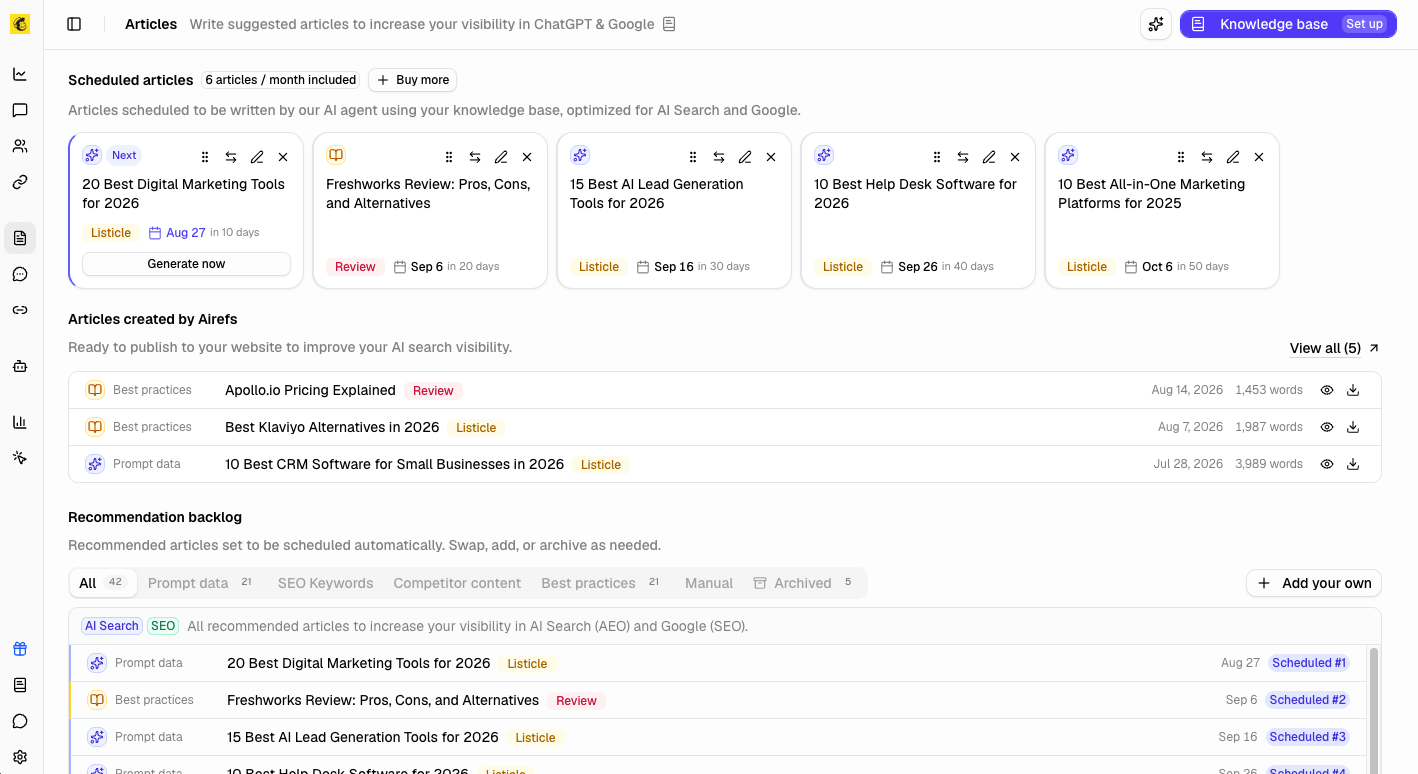
Recommendation backlog
The backlog lists every content gap Airefs has found for your site.
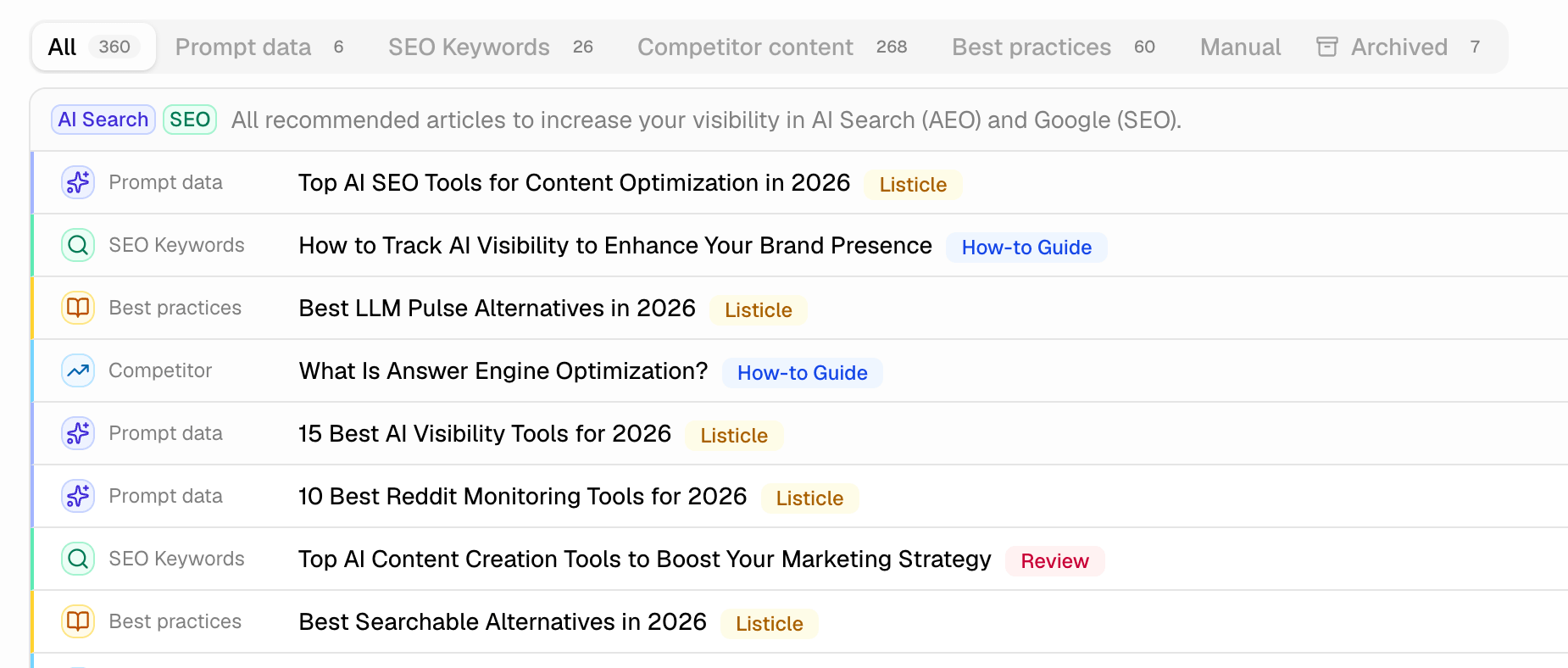
The backlog surfaces content gaps from five sources:
- Prompt data — what ChatGPT and other AI models cite for your tracked prompts.
- SEO Keywords — Google search volume, difficulty, and ranking gaps.
- Best practices — SEO and AI Search opportunities from your tracked competitors.
- Competitor content — competitor pages already ranking well in Google.
- Manual — ideas you add yourself.
Filter the backlog by tab to focus on one source. An Archived tab holds anything you’ve marked done or archived.
Each row shows:
- A source badge — hover it for citation counts and reasoning.
- A suggested title.
- A content-type badge, like Listicle, Guide, Comparison, or How-to Guide.
For Competitor content ideas, the tooltip also links to the source page.
Use the archive icon to remove an idea you don’t want. It moves to the Archived tab. You can restore it anytime.
Click Add your own to add an idea. Give it a title and a content type. It joins the backlog and fills the next open slot — or swap it in right away.
Automatic scheduling
Automatic scheduling and AI-generated articles are turned off for Done-For-You customers. Your content already runs through a dedicated pipeline — our own team selects the topics, writes each piece, and reviews it before it ships.
Airefs keeps up to 5 articles queued in Scheduled articles. It draws ideas from across your backlog sources, so no single source dominates. When a slot opens — an article is written, or you remove one — the next backlog idea fills it automatically.
Your plan sets how many articles you get by default:
- Lite — 1 article a month.
- Pro — 3 articles a month.
- Expert — 6 articles a month.
The heading badge shows your plan’s allotment. Click Buy more to request extra articles anytime.
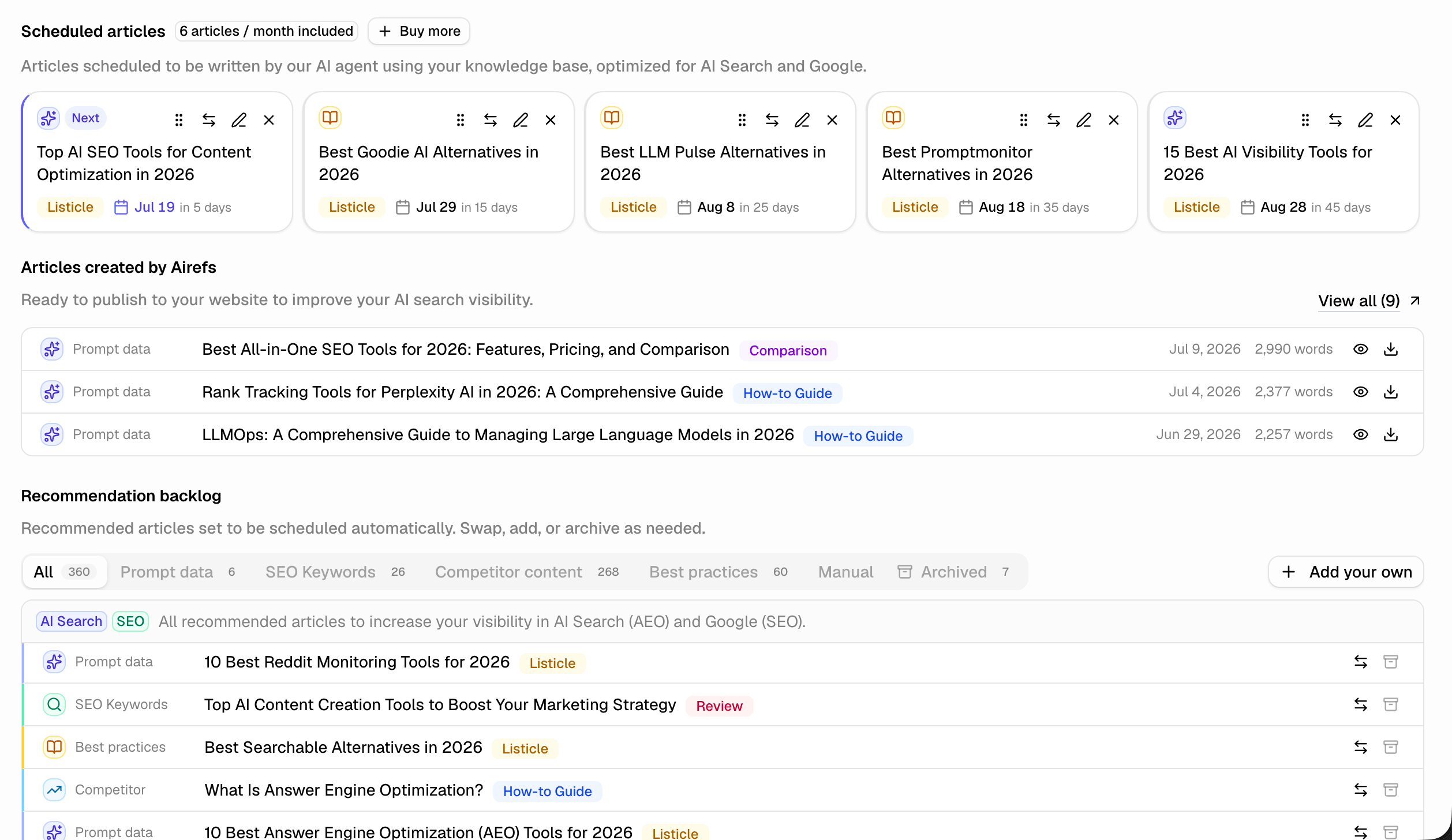
Each card shows:
- A source badge and the article title.
- A content-type badge.
- A projected date with a countdown (like “in 5 days”), or a Queued label if it’s not scheduled yet.
The next article to be generated is marked Next. Cards you’ve customized carry a Custom or Edited badge.
You’re not limited to watching the queue — each card supports:
- Reorder — drag a card by its grip handle to change the order articles will be written in.
- Swap — replace a scheduled slot with a different backlog idea. If the schedule is full, you’ll pick which of the 5 slots to replace.
- Edit — change a scheduled article’s title, content type, or slug, or add extra instructions before it’s written.
- Remove — take an article out of the schedule. If you’d customized it, Airefs asks you to confirm since edits are discarded. Agent-picked slots are removed immediately.
Removed or swapped-out ideas return to the backlog. The schedule automatically pulls in the next idea, so you always have up to 5 in flight.
The AI content agent
When your plan includes it, our AEO content agent writes each scheduled article. It researches, formats, and optimizes content to be cited in ChatGPT and rank in Google. You don’t need to brief it.
The agent uses your Knowledge base for context:
- Brand
- Competitive positioning
- Audience
- Writing style
The more complete it is, the more accurate your articles will be.
Articles are written in Markdown with proper heading structure. Comparison tables are included where relevant, and your brand is positioned naturally. They’re ready to publish as-is, or lightly edited to match your voice.
Articles created by Airefs
Once an article is ready, it appears under Articles created by Airefs. Click View all to see the full list.
Each row shows:
- Title and content-type badge.
- Delivery date and word count (desktop only).
- Icons to view or download it as Markdown.
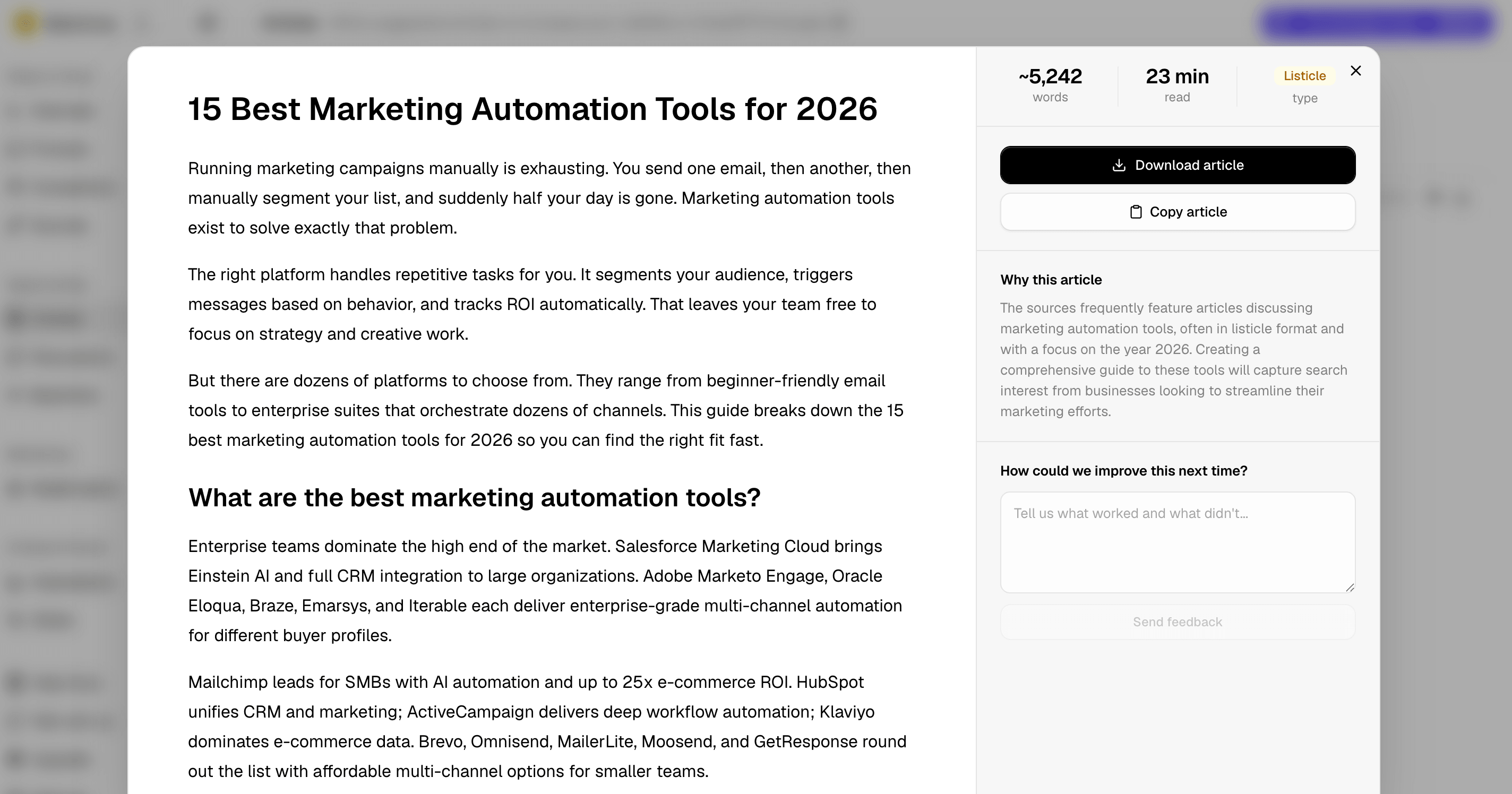
Opening an article shows its word count, read time, and content type. It also has Download article and Copy article buttons.
If it came from a recommendation, a Why this article section explains why. A feedback box lets you tell Airefs what worked.
Publishing webhook
Configure a publishing webhook from the Publishing drawer. Airefs sends an event when you publish an approved article manually, or immediately after approval when auto-publishing is enabled.
Each request is a JSON POST with these headers:
Authorization: Bearer apk_your_secret
Content-Type: application/json
X-Airefs-Signature: sha256=hex_hmac_sha256
X-Airefs-Timestamp: 2026-09-03T10:00:00.000Z
X-Airefs-Event: publish_articles
User-Agent: Airefs-Publish/1
The payload contains one article and embeds its generated images as base64. content_markdown is the article body without frontmatter and without a leading H1; the title is in title, so render it yourself:
{
  "event_type": "publish_articles",
  "timestamp": "2026-09-03T10:00:00.000Z",
  "data": {
    "articles": [
      {
        "id": "artifact_abc123",
        "title": "How to choose a sewing needle",
        "slug": "how-to-choose-a-sewing-needle",
        "content_markdown": "Choose the needle for your fabric before you thread anything...\n\n## Match the needle to the fabric\n\n...",
        "content_html": "<p>Choose the needle for your fabric before you thread anything...</p>\n<h2>Match the needle to the fabric</h2>\n<p>...</p>",
        "meta_description": "Choose the right sewing needle for your fabric and project.",
        "created_at": "2026-09-03T00:00:00.000Z",
        "image_url": null,
        "tags": [],
        "airefs": {
          "site_id": "site_abc123",
          "artifact_id": "artifact_abc123",
          "job_id": "job_abc123",
          "content_type": "How-to Guide",
          "word_count": 1240,
          "published_at_date": "2026-09-03"
        },
        "images": [
          {
            "path": "images/needle.png",
            "content_type": "image/png",
            "data_base64": "iVBORw0KGgoAAA..."
          }
        ]
      }
    ]
  }
}
Verify the signature against the raw request body before parsing JSON:
import crypto from "node:crypto";

export function verifyAirefsWebhook(rawBody, timestamp, signature, secret) {
  const expected = crypto
    .createHmac("sha256", secret)
    .update(timestamp + "." + rawBody)
    .digest();
  const provided = Buffer.from(signature.replace(/^sha256=/, ""), "hex");

  return provided.length === expected.length && crypto.timingSafeEqual(provided, expected);
}
For auto-published articles, network failures and HTTP 408, 409, 425, 429, and 5xx responses are retried three times: after 30 seconds, 5 minutes, and 30 minutes. Other 4xx responses are not retried, redirects are never followed and count as a permanent failure, and manual publishes are not retried automatically (use the Retry button).
Deliveries are at-least-once: if Airefs cannot record a successful delivery it retries, so receivers should treat data.articles[].id as an idempotency key and skip articles they have already stored.
The Send test event button posts the same headers and signature with event_type: "test" and one clearly fake article (id: "test", slug airefs-test-article). Receivers should acknowledge it with a 2xx without publishing anything; receivers that only accept publish_articles will report the test as failed even though real deliveries work.
Receivers built for Outrank’s publish_articles webhook work unchanged. Airefs sends a superset of the Outrank article fields.