
Prompts
Defined questions run in ChatGPT and Google AI Overview at scale to quickly find mentions and citations of your brand and competitors.
Prompts are the questions your customers ask AI models. Airefs runs them in ChatGPT by default, with web search enabled — the only mode that returns real citations — and optionally in Google AI Overview too. It records which brands were mentioned, at what position, and which URLs were cited.
Add prompts manually or pick from Airefs’ suggested list. Tag them to group by topic, or filter by country to track specific markets.
How to track the prompts that matter for your brand
Prompt selection is not keyword research. Search volume is irrelevant here. There is no volume data for AI prompts, nobody types the same question twice the same way, and a single answer can influence a purchase in a way a thousand impressions never will. Chasing “high-volume” phrasings is the wrong instinct.
What matters is coverage. Your prompt set should map the entry points a prospect can use to arrive at a solution like yours — every angle from which someone could ask AI for what you sell. If an entry point has no prompt, you have no visibility data for it, and you will never know a competitor owns it.
Work through these dimensions and write prompts for each:
- Service or product — what you actually sell, in the words buyers use, not your internal naming. “best email marketing platform”, “CRM for small business”.
- Feature — the specific capability people shortlist on. “email tool with automation workflows”, “CRM with built-in call recording”.
- Use case — the job to be done. “how to run a re-engagement campaign”, “tools for onboarding new customers automatically”.
- Pain point — the problem stated as the prospect feels it, before they know the category. “my emails keep landing in spam”, “how to stop losing leads in follow-up”.
- Audience or segment — who they are. “marketing software for e-commerce brands”, “CRM for agencies”.
- Location — where they are, when it changes the answer. “best accounting software in Australia”, “email platform GDPR compliant EU”.
- Alternatives — competitor-anchored queries. “alternatives to [competitor]”, “[competitor] vs [competitor]”.
In practice a complete map is 25–50 prompts per market, where a market is a country or a location you sell into. Below 25 you have blind spots; far beyond 50 you are mostly rephrasing prompts you already track, and AI answers for near-identical questions converge anyway.
Run the same set per market rather than translating one list loosely: answers differ by country, and a prompt set duplicated across countries lets you compare markets directly in the table. Group by Country to read one market at a time, and tag prompts by dimension — feature, pain point, alternatives — so you can see which entry points you own and which you are absent from.
A practical starting point: add the suggested prompts to cover solution, alternative, and education research, then fill the gaps by dimension until every entry point into your space has at least one prompt.
The prompts table
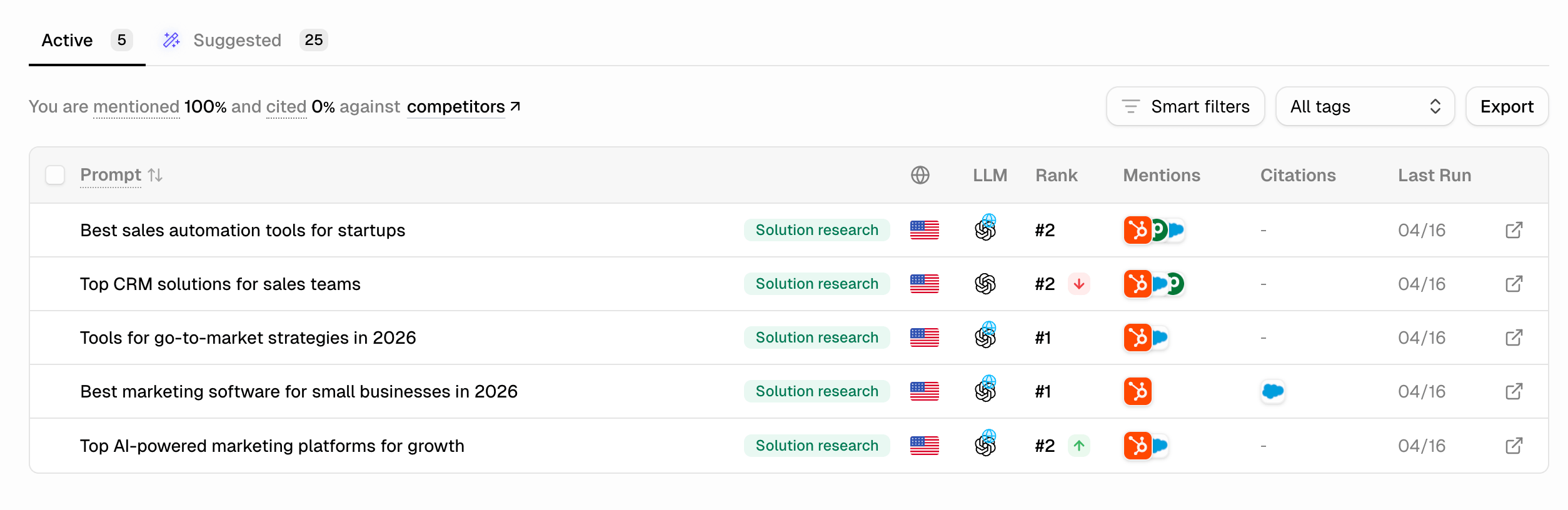
The Active tab shows all your running prompts. Columns are split into two bands, so you always read the answer and the sources separately:
- ChatGPT answers — Mentions, Position, and Last 10 answers: how your brand shows up inside the answer text.
- ChatGPT sources — Citations and Last 10 answers: whether your website was used as a source for that answer.
The band headers follow the answer source you’re viewing, so they read AI Overview answers and AI Overview sources when you switch to Google.
- Mentions — stacked brand favicons for every tracked brand named in the latest answer, yours first. A green + or red − chip appears when your brand was gained or lost since the previous answer.
- Position — where your brand sits in the latest answer (#1, #3…), with an arrow chip when it moved since the previous answer. Hover to see the previous position.
- Last 10 answers (answers band) — a dial with one dot per answer, newest first, filled when your brand was mentioned, plus the share of those answers as a percentage. Hover for a day-by-day strip.
- Citations — stacked favicons of the domains the answer cited as sources, yours first, with the same gained/lost chip.
- Last 10 answers (sources band) — the same dial for citations: how often your site was cited across the last 10 answers.
Percentages are colour-coded — green above 50%, then lime, amber, and red as coverage drops — so weak prompts stand out without reading numbers.
Hover a row to see when it last ran; click it to open the full AI answer. A blue rail and a Running badge mark a prompt mid-run, a red rail and a Failed run badge mark one that errored, and an amber warning badge means Google returned no AI Overview for that prompt.
A summary line at the top of the page reads as a sentence: your brand is mentioned X% and cited Y%, with the points gained or lost since the previous run and the date those answers came from. It always describes the filtered set below it, and History links through to the Overview page for the trend over time.
Grouping and sorting
By default prompts are grouped by Tag. Use the Group by control to switch to Country or to No groups for one flat list, and to expand or collapse all groups at once.
Group rows summarise the prompts inside them: the share of prompts where your brand was mentioned (or cited) in the latest answer, the average position across the prompts that ranked, and a sparkline with the pooled rate across the last 10 answers per prompt. Grouped by country, each group row carries its flag and prompt count — a fast way to see which markets you’re winning.
Click a column header to sort by Prompt, Position, or either Last 10 answers column. Grouping, sorting, filters, and search are all written into the URL, so any view you build can be bookmarked or shared.
Seeing the actual AI answer
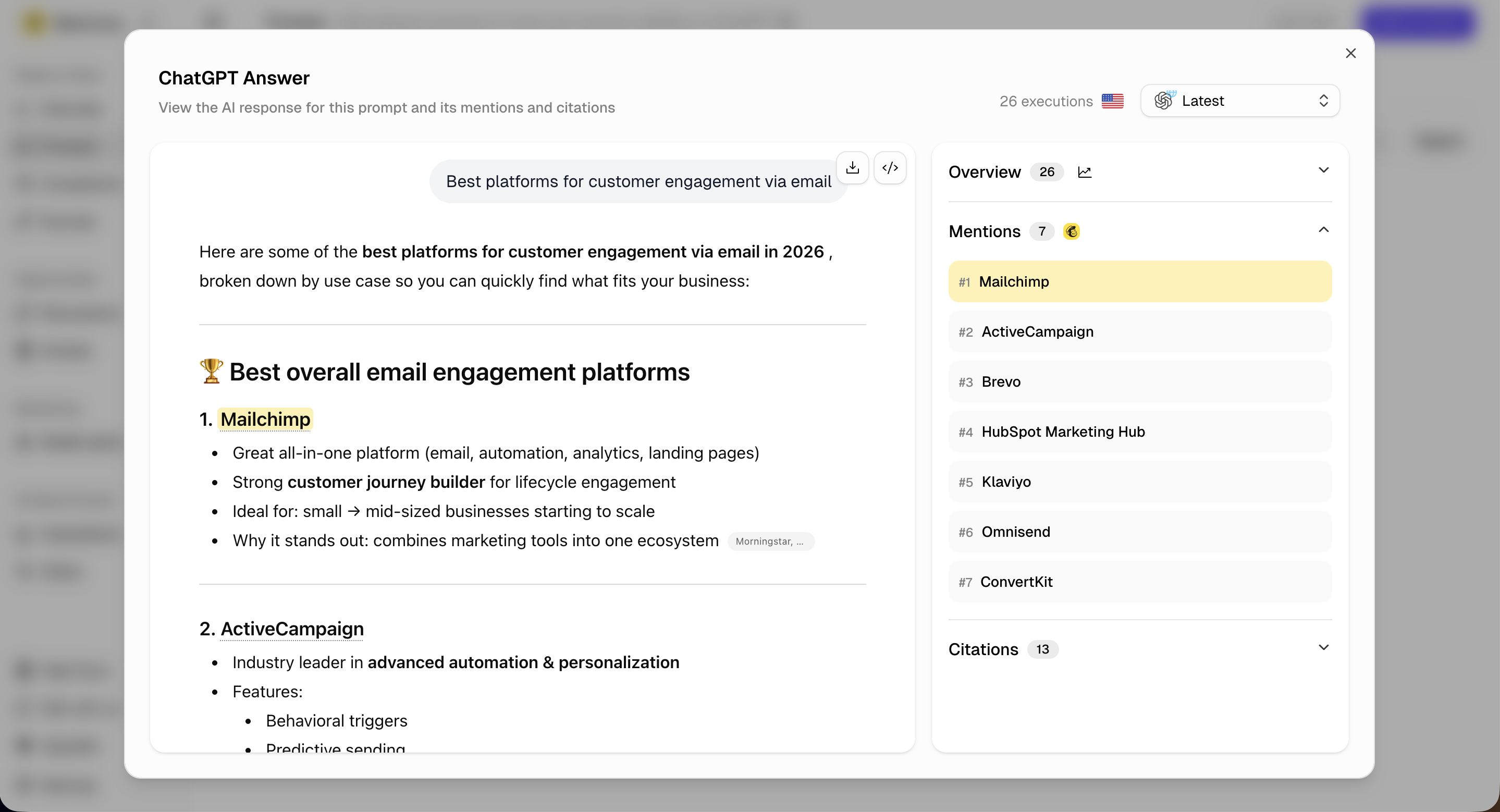
Percentages tell you whether you appear. The answer itself tells you why. Click any row to open the response exactly as the model returned it, with your brand highlighted in the text.
The side panel breaks the same answer into three parts:
- Mentions — every brand named in the answer, ranked #1, #2, #3…, with yours highlighted. This ranking is what the Position column reports; being the first brand recommended is very different from being fifth.
- Citations — the source URLs the model pulled from, with their domains. This is where you find out who is actually feeding the answer: a competitor’s comparison page, a Reddit thread, a review site, or your own content.
- History — a chart of how often this prompt mentioned and cited you across its runs, with the mentioned and cited rates side by side.
The execution picker at the top right steps back through previous runs of the same prompt, so you can compare today’s answer with the one that mentioned you last week and see what changed — new competitors named, a different source cited, a reworded recommendation.
Reading the answers is how prompt data becomes action. When a prompt shows you absent, the cited sources are the shortlist of pages and threads to influence; when a prompt shows you present, the wording around your brand tells you what the model believes about you.
Filters
The Filter menu narrows the table to the subset that matters right now. Smart filters are checkboxes, so you can tick several and see every prompt matching any of them:
- Brand present — prompts where your brand was mentioned or cited in the latest answer. Use this to confirm what’s working and monitor position on your wins.
- Brand absent — prompts where your brand appears in neither the answer nor the sources. This is your opportunity list: the queries competitors are winning that you’re invisible on.
- Recently lost — prompts where your brand appeared in the previous answer but is now gone. A sudden drop here is often caused by a competitor publishing new content or a source URL changing.
- Recently gained — prompts where your brand wasn’t present before but now is. This is the clearest signal that a piece of content you published or a discussion you joined is having an effect.
Recently gained and Recently lost are the most actionable views. Gained confirms which AEO efforts are paying off. Lost shows where you need to act before a competitor cements their position.
The same menu filters by a single country or tag, and Clear filters resets everything at once. Free-text search sits in the table header and matches prompt text.
Bulk actions and export
Tick the checkbox on any row — shift-click to select a range — and the toolbar switches to bulk actions: apply or remove tags across the selection, delete the selected prompts and their history, or clear the selection.
The ⋯ menu exports the current view to CSV, with one row per prompt: prompt text, tags, model, web search, country, rank, mentions, citations, all mentions, last run, status, and prompt ID.
Suggested prompts
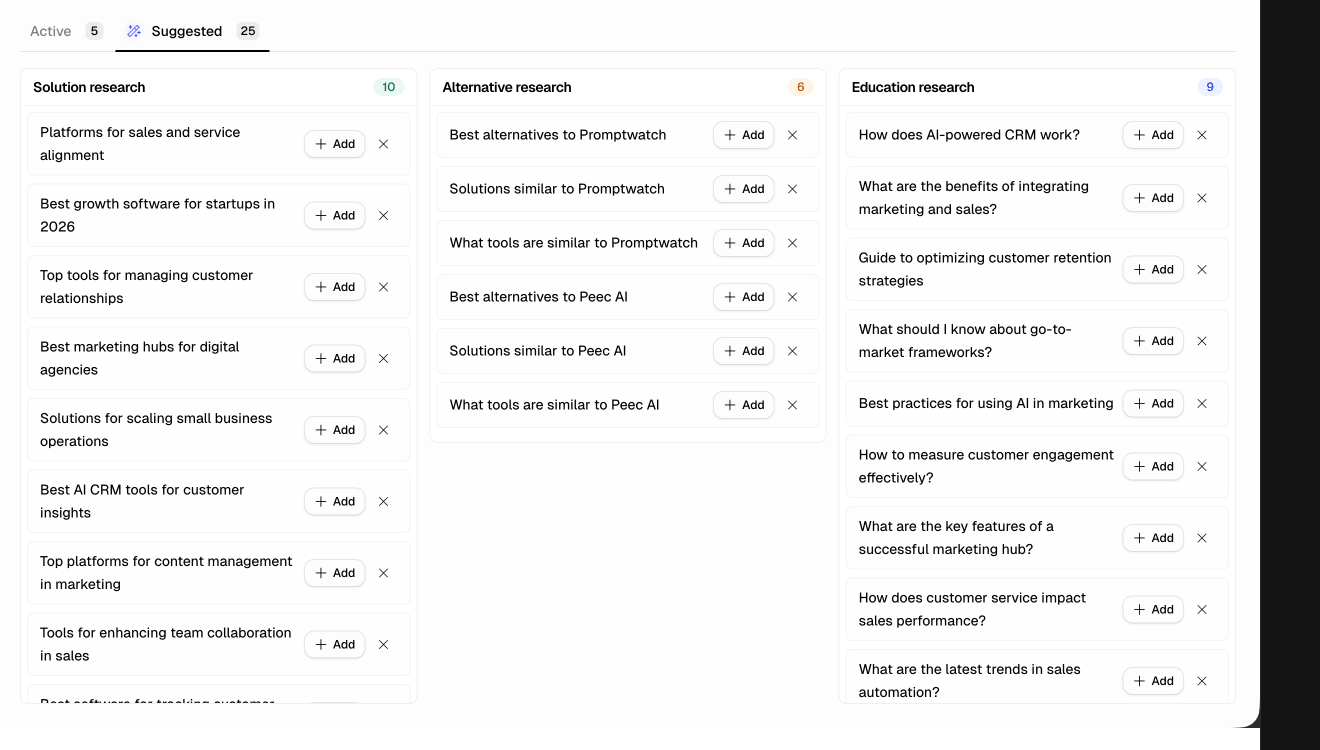
The Suggested tab gives you a pre-built list of prompts organised into three research categories. You can add any of them to your active tracking with one click.
Solution research
Buying-intent queries from people actively evaluating tools — “best sales automation tools for startups”, “top CRM solutions for sales teams”, “best marketing software for small businesses”. These are the highest-value prompts: appearing here means appearing in front of buyers who are ready to decide.
Alternative research
Competitor comparison queries — “best alternatives to [competitor]”, “solutions similar to [competitor]”, “what tools are similar to [competitor]”. These capture buyers who are already using a competitor and looking to switch. Being present here is one of the fastest ways to gain share from competitors who already have market awareness.
Education research
Informational queries your target audience asks about the industry — “how does AI-powered CRM work?”, “what are the benefits of integrating marketing and sales?”. With these prompts, you likely won’t be mentioned directly — brand mentions are less common in educational answers. Your goal is to appear in the Citations column, meaning the AI used your content to formulate the answer.
That’s a powerful signal and a path to growing brand presence over time.
Web search must be enabled on prompts to get citations. Airefs enables this by default — without it, ChatGPT draws only from its training data and returns no source URLs.
Enabling Google AI Overview
By default, prompts run in ChatGPT only. To add Google AI Overview, click the Google toggle at the top left of the Prompts page or enable it from the subscription page.
Once enabled, that toggle switches the whole table between sources: column headers, mentions, positions, and citation dials all reload for the source you selected, and the choice is carried in the URL so a shared link opens on the same view.
Prompt limits by plan
| Plan | Prompts |
|---|---|
| Lite | 25 |
| Pro | 60 |
| Expert | 150 |