Clicks
Visits to your site from users who clicked your mention or citation in an AI answer — the direct connection between AI visibility and real traffic.
Set up
Choose the integration that fits your stack:
- WordPress — install the Airefs WordPress Plugin. Clicks tracking is enabled automatically.
- All other platforms — add the tracking script to your site’s global HTML head:
- In Airefs, go to Site Settings → Tracking Script.
- Copy the snippet shown — it already includes your public site key.
- Paste it into your site’s global HTML
<head>so it loads on every page.
The public script automatically tracks browser visits and attributes AI Search Clicks when users arrive from sources like ChatGPT, Perplexity, Claude, Gemini, Copilot, and Meta AI.
After installing the script, it may take 1–2 days before your first AI-referred click appears — LLM visits don’t happen on a predictable schedule. To confirm the script is correctly installed, visit Site Settings → Tracking Script in Airefs.
What it is
Clicks tracks visits to your website from real users who saw your brand cited in a ChatGPT, Perplexity, or other AI answer — and clicked through. Unlike Impressions, which tracks AI crawler visits, Clicks tracks human traffic originating from AI search.
It’s the clearest signal that your AI visibility is translating into real business outcomes — not just crawls or brand mentions.
Reading the data
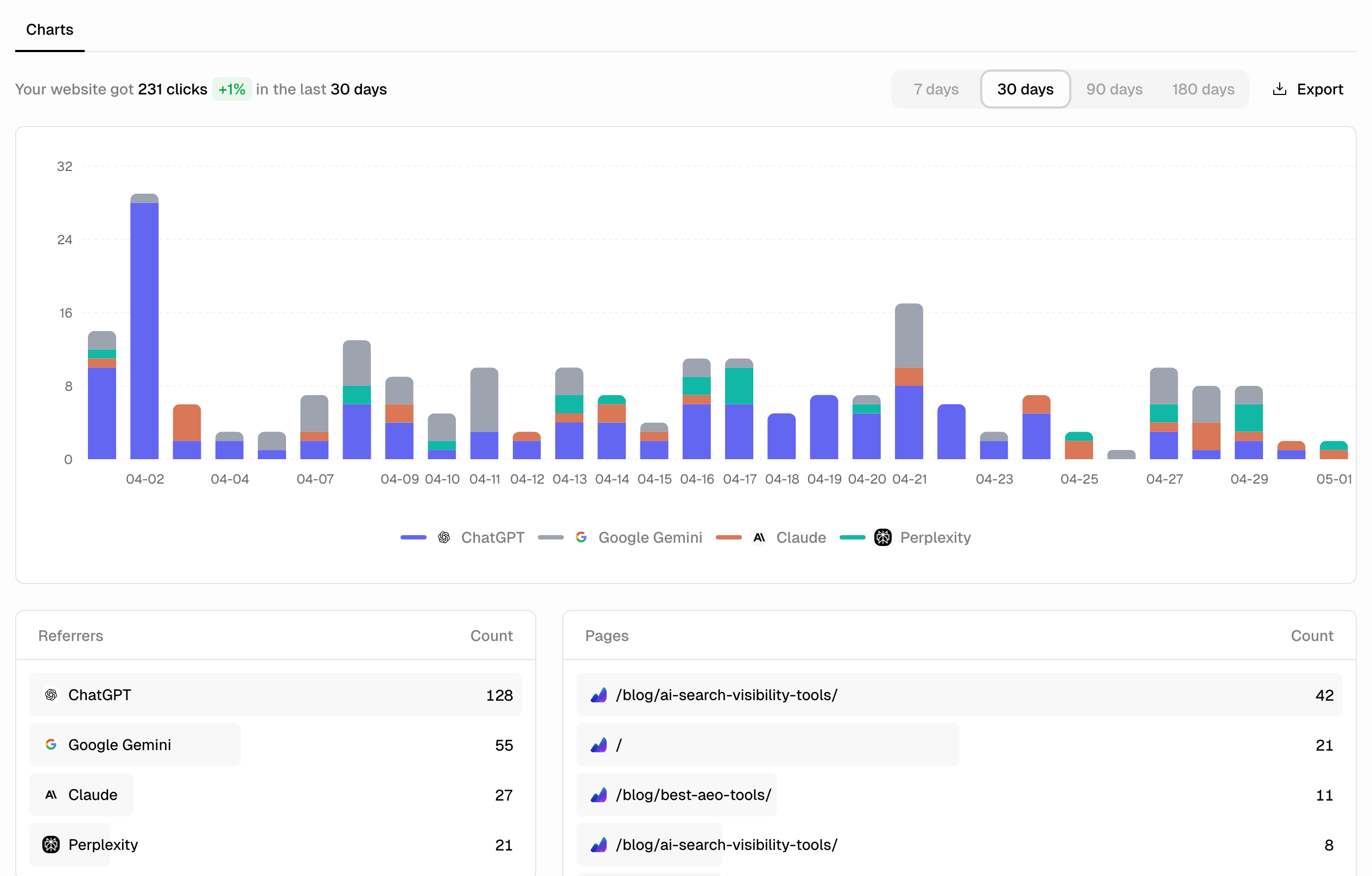
The bar chart breaks down clicks by AI source — ChatGPT, Google Gemini, Claude, and Perplexity. Switch between 7, 30, 90, and 180-day windows to spot trends over time.
The Referrers table ranks each AI source by total click volume. The Pages table shows which of your pages are receiving the most AI-referred traffic. Together they show both the source and destination of your AI clicks.
How it differs from Google Analytics
Airefs reports more clicks than Google Analytics for the same period, because it records each individual click rather than deduplicating by session. This is intentional — it gives you a more accurate picture of how often users are acting on AI citations.
How to use it
- Clicks trending up with citation rate — healthy signal. Your citations are generating real interest and the AI is recommending you in answer positions that drive action.
- High citations, low clicks — your brand may be appearing passively (mentioned in a list, not recommended directly). Focus on prompts where you’re the primary recommendation, not just one of many.
- Spikes on specific pages — cross-reference with Impressions to see which content is pulling both crawler visits and human clicks. Double down on that content.
Most LLM user visits don’t come from direct clicks — AI answers often don’t show clickable links, or users don’t click through. Clicks is still a valuable indicator: the pages that do get clicks from AI are your strongest-performing content in AI search.