Impressions
AI agents visiting your pages to answer user queries or gather training data — tracked in real time so you can see what's getting noticed.
The prompts you track are only a sample of everything happening in AI search. Impressions shows the bigger picture — every AI crawler visiting your site, pulled straight from your server logs.
Set up
Impressions requires a small server-side integration with your website, since AI crawlers rarely execute JavaScript. Pick the option that matches your stack:
- WordPress — install the Airefs WordPress Plugin
- Cloudflare — a lightweight Worker or a Logpush job, see the Cloudflare integration
- Vercel — a zero-code Log Drain (Pro/Enterprise) or a small middleware on any plan, see the Vercel integration
- Netlify — a zero-code Log Drain or a small Edge Function, see the Netlify integration
- AWS CloudFront — stream access logs with Amazon Data Firehose, see the CloudFront integration
- Fastly — stream access logs over HTTPS, see the Fastly integration
- Akamai — stream edge logs with DataStream 2, see the Akamai integration
- Any other framework or platform — call the API integration directly from your server, or batch-forward logs with the HTTP Log API (find your access token under Site Settings → Access Token)
Webflow and Framer don’t support server-side integrations, so Impressions tracking isn’t available on those platforms.
What it is
Airefs identifies and organizes the AI crawler activity in your logs, and shows you which pages are being crawled, by which AI systems, and how often.
Impressions is key for understanding trends over time: are your AI mentions going up or down? Are recent content or PR efforts driving more crawler activity?
No crawler activity means you’re not on the path to being cited. Heavy activity on specific pages shows what’s working — that’s where to double down.
As your AI visibility grows, crawler activity tends to follow. Teams that build strong citation share often see compounding impression growth — more citations drive more crawls, which increases the chance of further citations.
Charts and logs
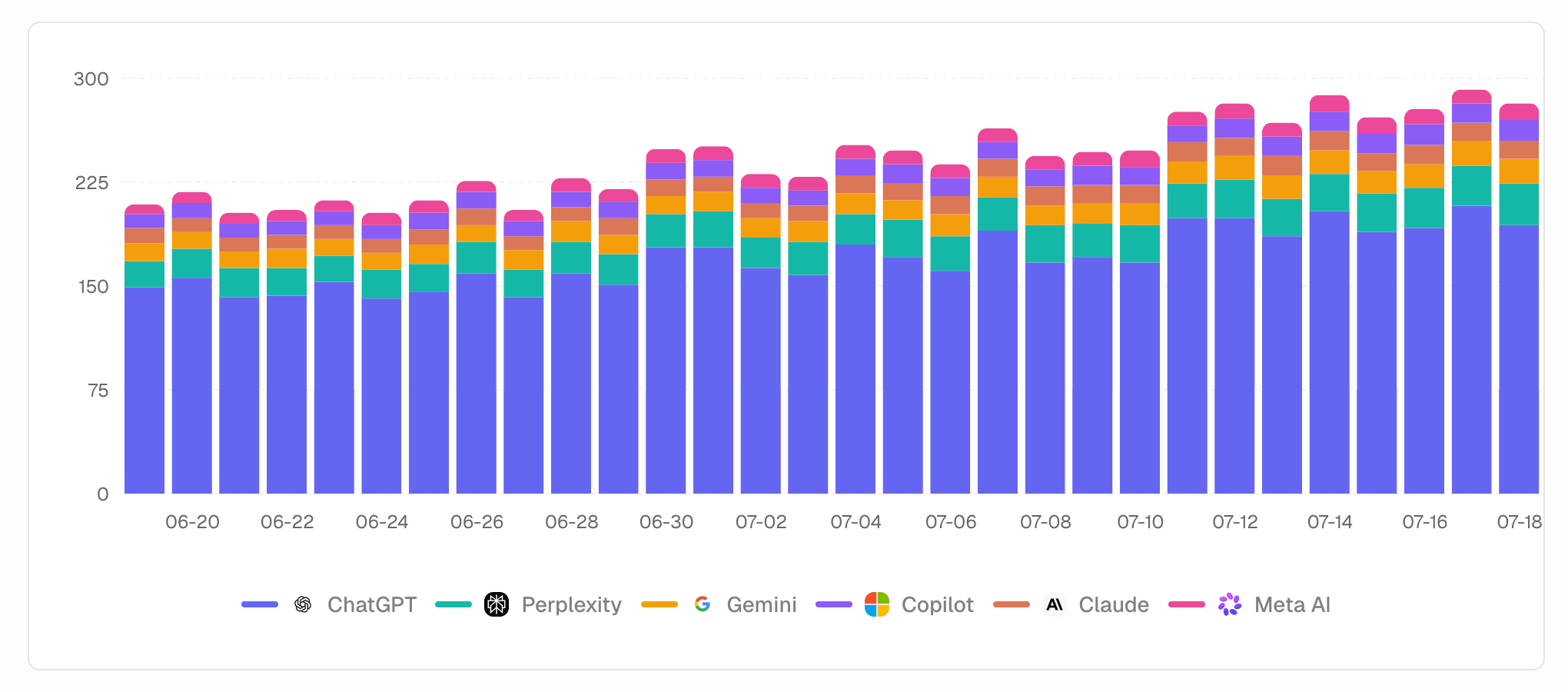
The Charts view shows total impressions over time broken down by crawler (ChatGPT, Perplexity, Claude, Amazon Bot, etc.).
AI systems crawl websites for different reasons, including training and background indexing — but the most important filter here is “User searches only”. It narrows the data to visits made while an AI agent is answering a live user query, which is the signal most relevant to your AI search visibility.
Pages table
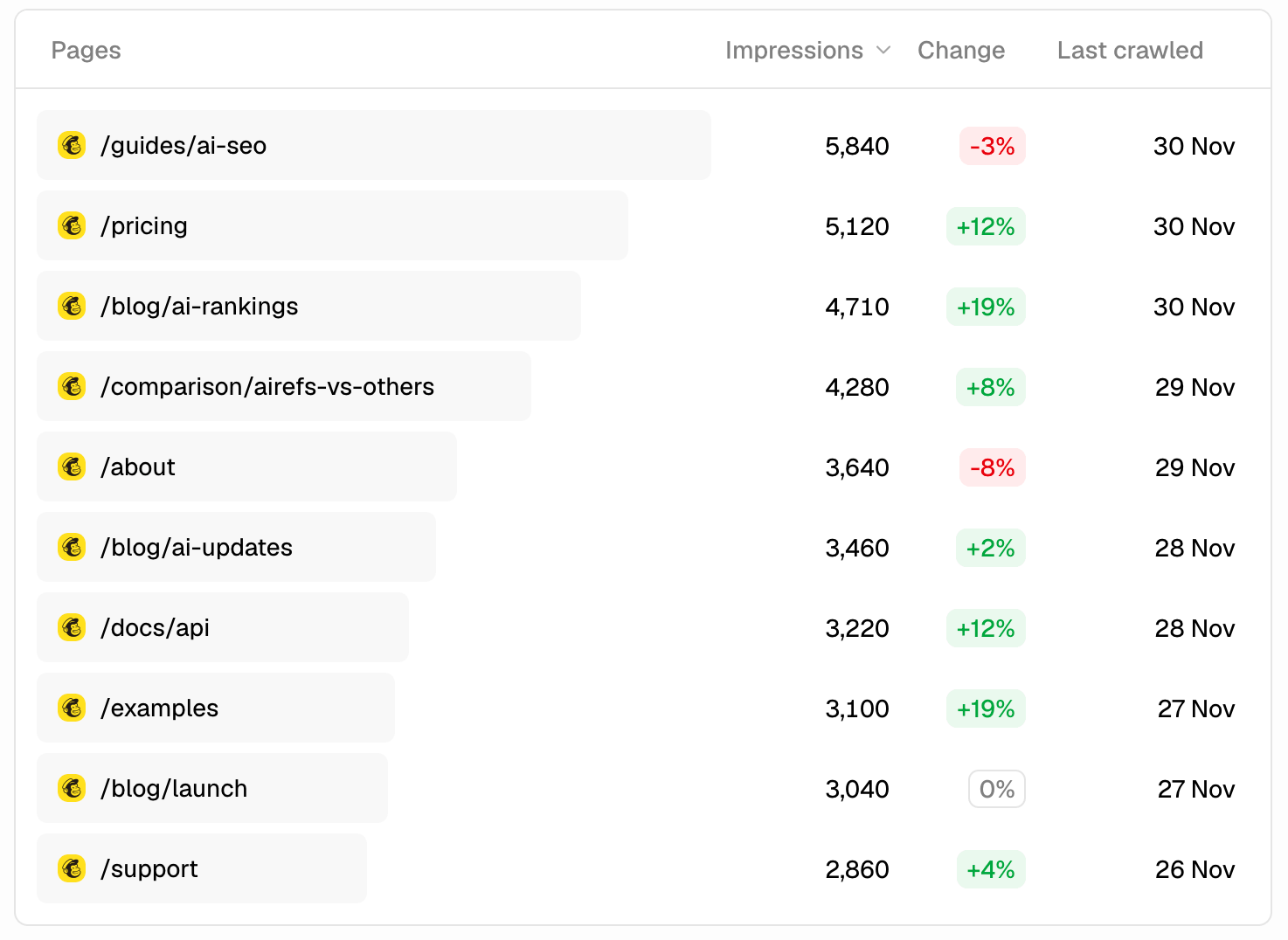
The Pages tab ranks every page on your site by total AI impressions, with the change versus the prior period and the date each page was last crawled. Your highest-impression pages are the ones AI systems consider most relevant to the queries they’re answering.
Pages with high impressions but low citations (check the Prompts page) are being crawled but not cited. That gap usually means the content is indexed but not authoritative enough. Improving depth, structure, or specificity can close it.
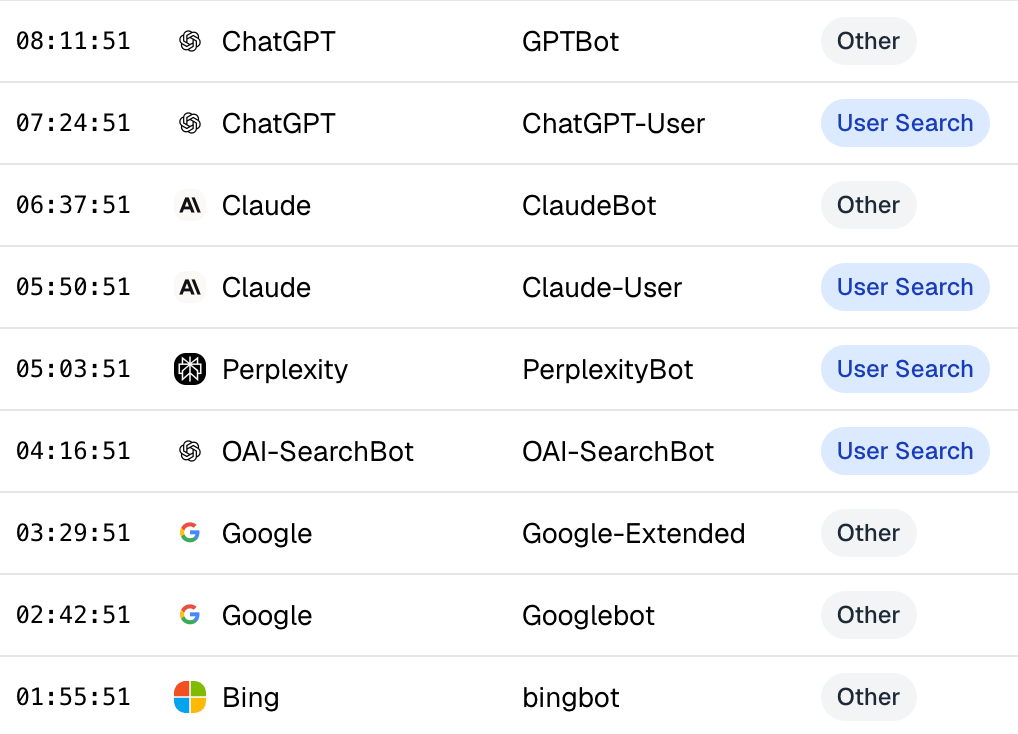
The Logs view shows individual visits in real time: timestamp, LLM name, bot name, whether it was a user search, IP address, and the specific page path visited.
Caveats
Impressions tracking is useful for trend analysis, but has inherent limitations worth understanding:
- Over-reporting: a page being crawled doesn’t always mean it appeared in the final AI answer. A single user prompt can also cause multiple pages from your site to be crawled.
- Under-reporting: if an AI uses a pre-trained response and doesn’t run a live search, that activity isn’t detected. If an AI loads a cached version of your page, the tracking script may not fire.
- No visibility rank: even if your page was cited, you can’t see how prominent it was in the answer — top result or buried among sources.
Use Impressions for directional trends and page-level discovery patterns — not as a precise measure of AI citations. For citation accuracy, rely on Prompt execution data.